Last Updated: June 2, 2026
Salesforce AI is the collection of Einstein, Agentforce, predictive analytics, generative AI, bot, automation, and developer features that run on Salesforce data. Use it when the action needs CRM context: a sales forecast, a service reply, a case triage recommendation, a campaign send-time prediction, or a flow draft that an admin can review before activation.
This guide explains where Salesforce artificial intelligence fits, which features admins should evaluate first, how Einstein for Flow, Marketing Cloud Einstein, and Einstein Bot projects differ, and how developers should enforce security when AI output touches Salesforce records. For related background, see our guides to Salesforce Flow automation, Apex development in Salesforce, and Salesforce Service Cloud implementation.
What is Salesforce AI?
Salesforce AI is not one setup switch. It is a portfolio of features under Einstein and Agentforce, plus platform services that let admins, marketers, service leaders, sales managers, and developers apply AI to CRM work. Salesforce Help describes Einstein generative AI and Agentforce as part of the same AI journey for Salesforce users, while the developer documentation exposes APIs for custom models and agents.
In enterprise orgs, the useful way to classify Salesforce AI is by decision type. Predictive features estimate an outcome, such as lead conversion or case routing. Generative features draft content, summarize records, or assist with Flow setup. Agent features use instructions, actions, and business context to complete tasks across conversations. Bot features handle structured service conversations through configured dialogs and channels.
| AI area | Typical Salesforce feature | Best fit | Implementation concern |
|---|---|---|---|
| Predictive AI | Opportunity scoring, forecast signals, Einstein Discovery predictions | Prioritization and next-best review | Historical data quality and model explainability |
| Generative AI | Sales emails, service replies, summaries, Prompt Builder, drafted flows | Drafting and summarization with human review | Grounding, prompt design, approval, and data masking |
| Agentic AI | Agentforce agents with actions | Guided task completion through a conversational interface | Action permissions, test coverage, fallback handling, and auditability |
| Conversational service | Einstein Bot for web, messaging, and supported service channels | Reusable service questions and case deflection | Intent training, handoff rules, and channel setup |
| Marketing AI | Marketing Cloud Einstein engagement, send-time, frequency, and insight features | Segmentation and timing decisions | Consent, data extensions, and campaign measurement |
How does Salesforce AI fit into an enterprise architecture?
The safest architecture treats AI as an assistant around governed CRM processes, not as a bypass around permissions or approval. A good pattern is: retrieve only the records the user can access, ground the prompt with the smallest useful context, let AI produce a draft or recommendation, require a user or automation rule to approve the action, and write the final change through normal Salesforce security controls.
The Einstein Trust Layer is Salesforce’s security architecture for generative AI. Salesforce describes it as a set of data, privacy, and security controls built into the platform experience. Trailhead also explains the Trust Layer as a sequence of retrieval and gateway controls for trusted generative AI. For an implementation team, this means Salesforce AI design still starts with sharing settings, permission sets, field-level security, data classification, and retention policy.
Salesforce artificial intelligence data flow
A production Salesforce artificial intelligence design should document each data movement. List the source objects, fields used for grounding, prompt template inputs, model or agent entry point, response destination, and audit record. This prevents a common error: sending more record data than the use case needs because it is available in the org.
- Record access: Query in user mode when the result will be shown to the current user.
- Field access: Enforce CRUD and FLS in Apex, LWC controllers, and invocable actions.
- Prompt context: Use record summaries and controlled variables instead of raw transcript dumps when possible.
- Human review: Keep humans in the loop for external emails, regulated advice, escalations, and record updates that affect customers.
- Logging: Store enough metadata to troubleshoot the flow, bot, prompt, or agent without storing sensitive prompt text unnecessarily.
Salesforce AI features for Sales Cloud
Sales teams usually meet Salesforce AI through opportunity insights, scoring, forecast signals, email assistance, activity capture, and conversation analysis. These features depend on clean CRM history. If your org has duplicate accounts, inconsistent stages, missing contact roles, or sales activities outside Salesforce, the implementation effort should begin with data hygiene before feature rollout.
Opportunity insights and deal review
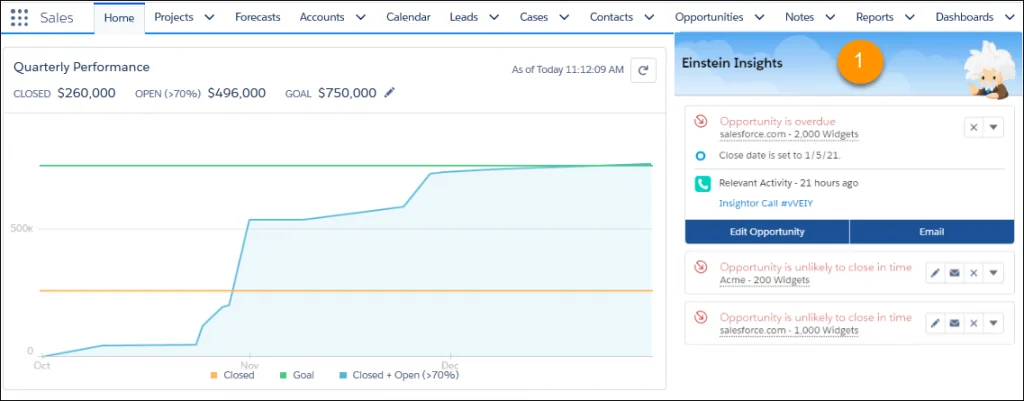
Opportunity insights surface signals that can help a sales user review a deal. In practice, admins should avoid treating a score or insight as a replacement for pipeline inspection. Configure the page so the sales rep sees the insight beside the opportunity fields they already use: stage, close date, amount, next step, last activity, and forecast category.
Pipeline inspection and tiered scores
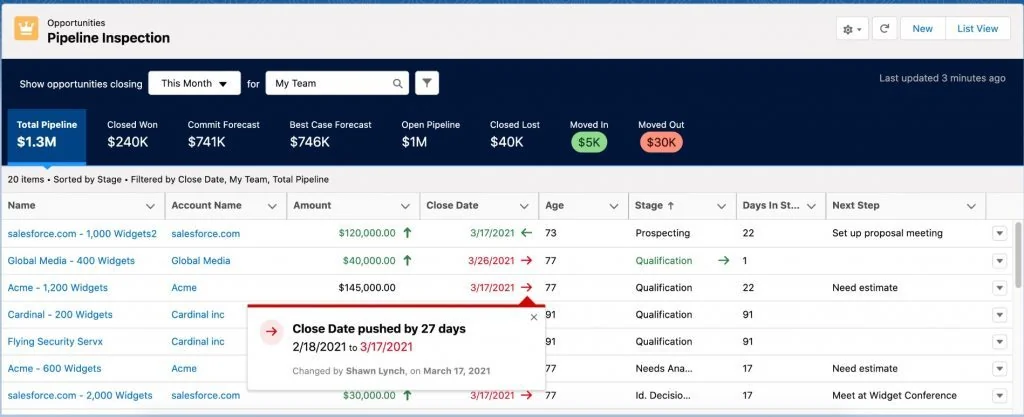
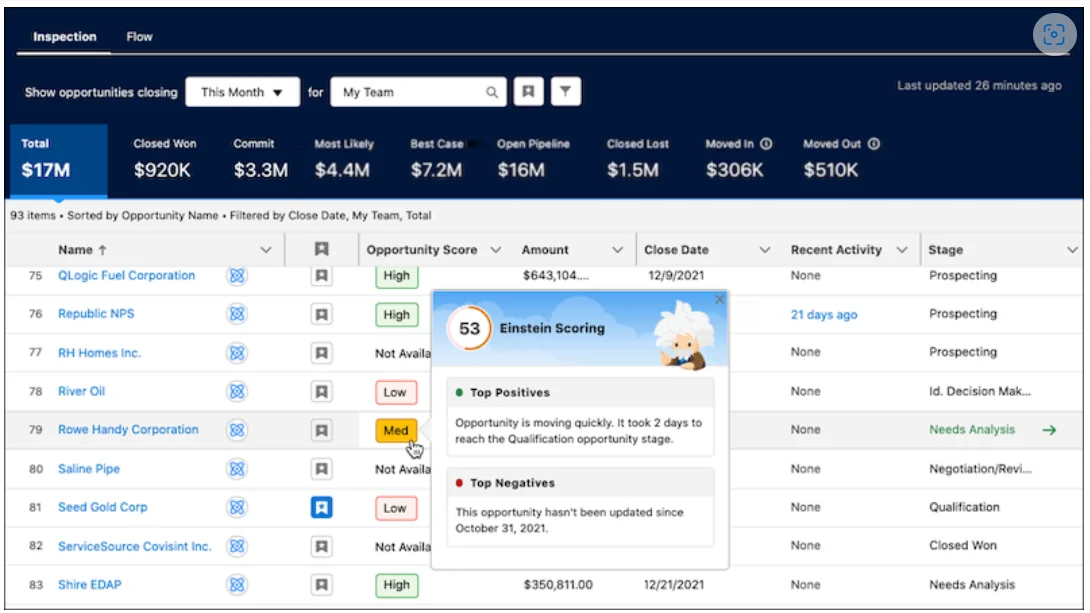
Pipeline inspection combines opportunity changes, forecast context, and deal signals in one view. Sales managers use it during inspection meetings because the screen shows what changed, not only the current amount. When Salesforce AI scores are shown in tiers, train managers to ask why a deal moved between tiers instead of treating the tier as a final answer.
Einstein forecasting
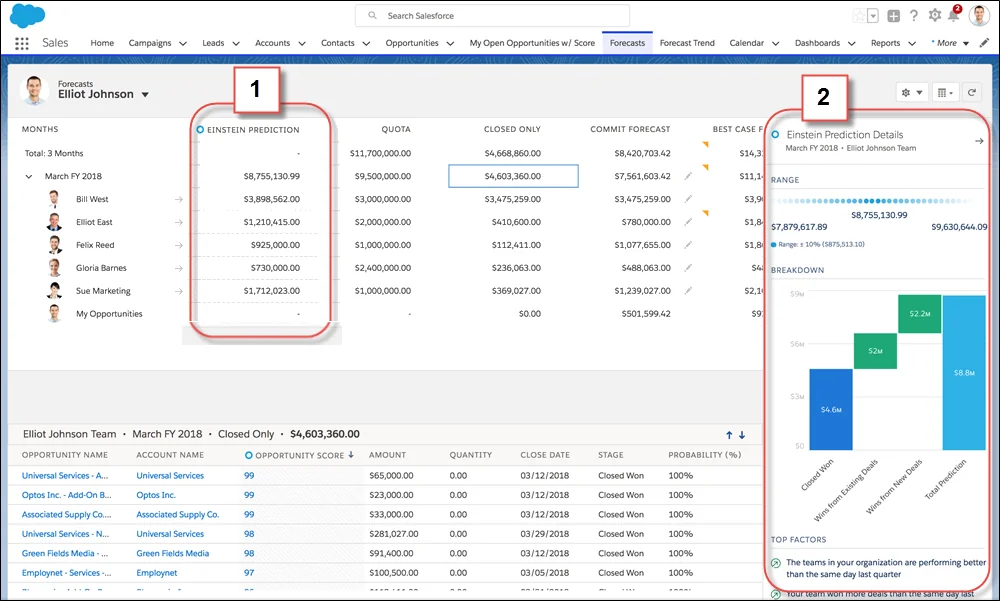
Einstein forecasting can help teams compare expected sales performance with prediction signals. The admin task is not only enabling a feature. You must confirm forecast hierarchy, quota data, opportunity stage discipline, and close-date hygiene. A weak forecast process creates weak Salesforce AI inputs.
Account insights and relationship signals
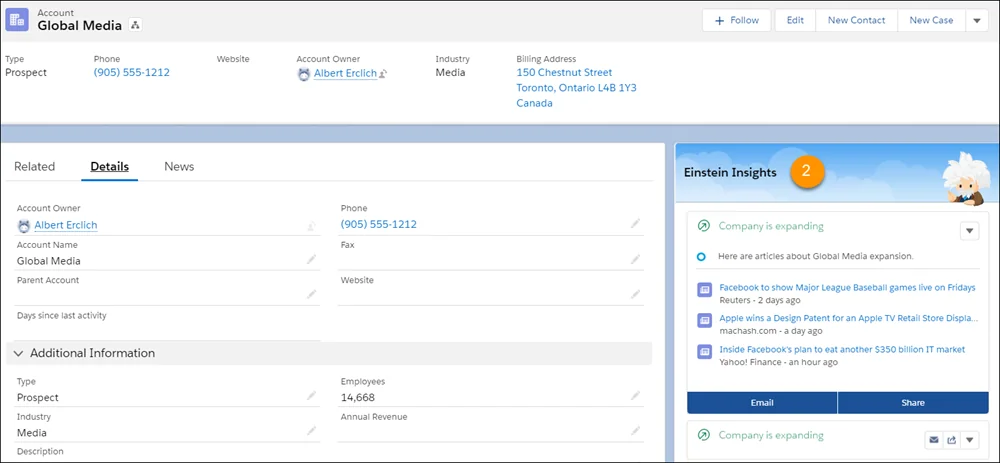
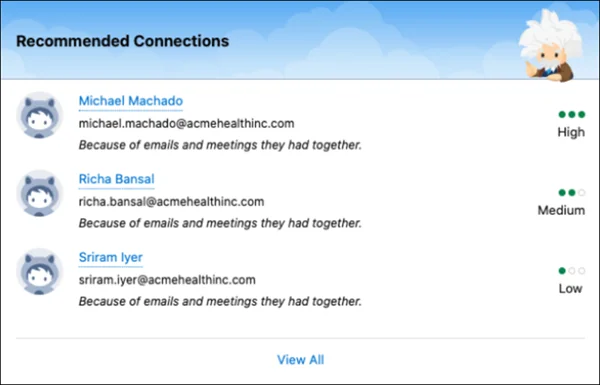
Account insights and recommended connections can help account teams find context before calling a customer. For enterprise orgs, review privacy expectations around email and calendar-derived relationship data. Users should understand which signals are visible, why they are shown, and where to correct source data.
Activity capture and conversation intelligence
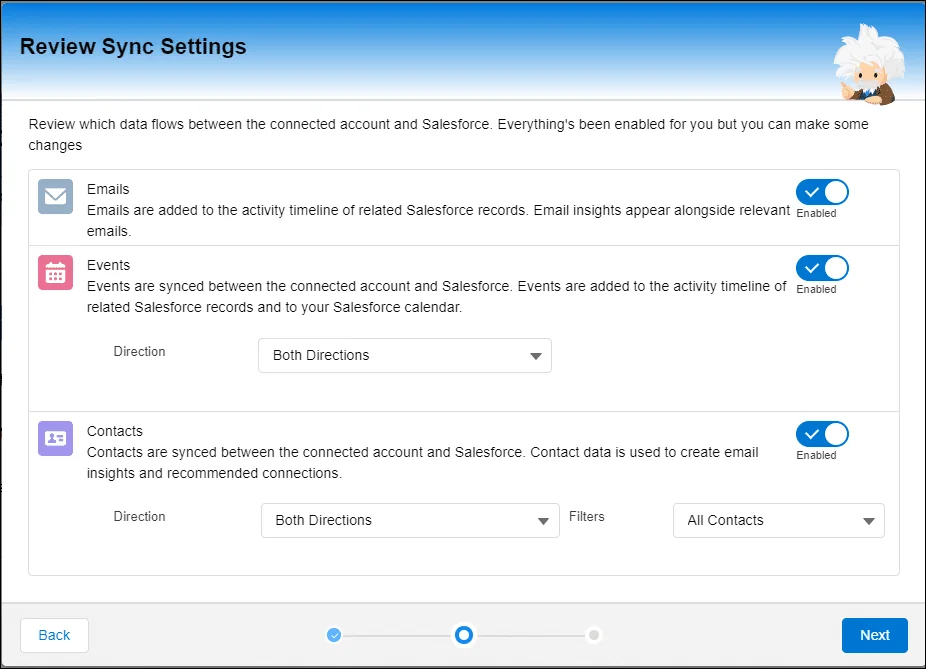
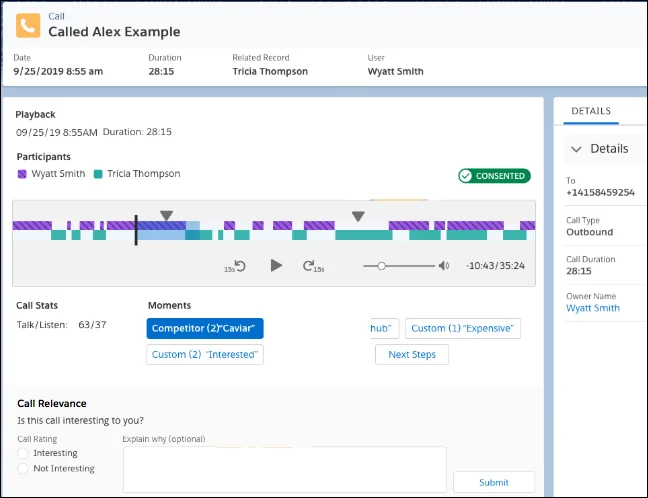
Einstein Activity Capture syncs email and calendar activity between supported mail systems and Salesforce. Conversation intelligence helps teams review sales call themes and follow-up needs. These Salesforce AI features work best when legal, compliance, sales operations, and admins agree on recording consent, data retention, and who can view conversation insights.
How does Service Cloud use Salesforce artificial intelligence?
Service Cloud uses Salesforce artificial intelligence to reduce repetitive agent work and improve case handling. Common use cases include case classification, suggested replies, article recommendations, work summaries, routing support, and bot conversations. The first implementation decision is whether the process is structured enough for automation. A refund policy question, order status lookup, or password reset is a better first use case than a complaint that needs judgment.
Einstein Bot setup for service teams
An Einstein Bot is a configured Salesforce bot for service conversations. Salesforce Help says bots can support multi-channel and multilingual service use cases, and the Einstein Bots setup documentation starts with a guided setup flow. Trailhead’s Einstein Bots material also recommends planning the bot content before enabling it. For a first release, create a narrow bot with a small number of high-volume intents, clear handoff to agents, and a fallback message that does not trap the customer.
- Choose the channel: embedded service, messaging, or another supported service channel.
- Define intents from real support data, not from a workshop guess.
- Write utterances that reflect how customers actually ask the question.
- Map each dialog to a business action, Knowledge article, or agent transfer.
- Test with misspellings, short messages, unclear replies, and opt-out requests.
- Review containment rate with case quality, not as a standalone metric.
Case classification and article recommendations
Case classification is useful when historical cases show repeatable values such as type, reason, product, priority, or language. Article recommendations work when Knowledge content is current and mapped to the cases agents actually solve. Before switching on automation, clean the closed-case training set and remove fields that agents filled inconsistently.
How does Marketing Cloud Einstein support campaigns?
Marketing Cloud Einstein is the AI feature set inside Marketing Cloud Engagement for decisions such as engagement scoring, send-time optimization, frequency optimization, content insights, and messaging insights. Salesforce Help states that Einstein in Marketing Cloud Engagement provides insights and data to inform content and timing decisions. Trailhead’s Marketing Cloud Einstein trail covers activation, engagement scoring, send time, frequency, and messaging insights.
Admins and marketers should connect these features to a measurement plan. For example, send-time recommendations should be compared against a control group where possible. Engagement scores should feed segments only after the team checks consent, suppression rules, and the business definition of inactivity.
Marketing Cloud Einstein implementation checks
| Check | Why it matters | Owner |
|---|---|---|
| Contact identity | Einstein output is only useful when subscribers, contacts, and keys are mapped correctly. | Marketing operations |
| Consent and suppression | Salesforce AI segmentation must not override opt-out or regional consent rules. | Compliance and marketing admin |
| Campaign control group | Without a control, teams cannot prove whether send-time or frequency changes helped. | Campaign manager |
| Content taxonomy | Content insights need consistent tags and campaign naming to be useful. | Marketing admin |
How does Einstein for Flow work in 2026?
Einstein for Flow has changed as Salesforce moved more generative AI work into Agentforce-branded setup experiences. Salesforce Help currently documents Agentforce-drafted flows as Beta and refers to enabling generative AI and the required Flow permissions. Treat Beta flow generation as a drafting aid. Do not activate an Salesforce AI-drafted flow until an admin reviews entry criteria, record-trigger timing, fault paths, decision outcomes, and test data.
Einstein for Flow review checklist
- Object and trigger: Confirm the flow uses the correct object and runs before save, after save, scheduled, screen, or autolaunched as intended.
- Element count: Keep the first version small enough to review. Split large logic into subflows where ownership is clear.
- Fault handling: Add fault paths for record updates, callouts, invocable actions, and subflows.
- Security: Check whether the flow runs in user context, system context, or system context with sharing, and document why.
- Testing: Use debug runs and real sample records before activation. For record-triggered flows, test bulk updates.
- Deployment: Move with change sets, DevOps Center, Salesforce CLI, or your CI/CD tool after peer review.
Einstein Discovery predictions in Flow
Salesforce also documents an Einstein Discovery action for Flow that returns predictive and prescriptive intelligence from Einstein Discovery-powered models. This is a different pattern from a generative flow draft. The flow sends selected row or field values to a trained prediction model and uses the returned score or recommendation in process logic.
How can developers extend Salesforce AI safely?
Developers can extend Salesforce AI through Prompt Builder inputs, Flow actions, Apex invocable actions, the Models API, the Agent API, and Agentforce custom actions. The Models API developer guide describes Apex classes and REST endpoints for connecting Salesforce applications to configured large language models. The Agent API guide documents how external applications communicate with AI agents through REST sessions and messages. For actions, Salesforce developer documentation shows that an Apex method annotated with @InvocableMethod can be exposed as a custom Agentforce action.
Secure Apex context for a Salesforce AI prompt
The following Apex class returns a small Case context object for a Lightning Web Component, screen flow, prompt input, or reviewed service-assist screen. It uses WITH USER_MODE, which Salesforce recommends for SOQL when you need user-mode object and field access enforcement in Apex. Keep the query selective and avoid sending full record data unless the Salesforce AI use case needs it.
public with sharing class AiCaseContextController {
    public class CaseContext {
        @AuraEnabled public Id caseId;
        @AuraEnabled public String caseNumber;
        @AuraEnabled public String subject;
        @AuraEnabled public String status;
        @AuraEnabled public String priority;
        @AuraEnabled public String customerSummary;
    }

    @AuraEnabled(cacheable=true)
    public static CaseContext getContext(Id caseId) {
        if (caseId == null || caseId.getSObjectType() != Case.SObjectType) {
            throw new AuraHandledException('A valid Case Id is required.');
        }

        List<Case> records = [
            SELECT Id, CaseNumber, Subject, Status, Priority, Origin, Description, Account.Name
            FROM Case
            WHERE Id = :caseId
            WITH USER_MODE
            LIMIT 1
        ];

        if (records.isEmpty()) {
            throw new AuraHandledException('Case not found or not visible to the running user.');
        }

        Case c = records[0];
        CaseContext output = new CaseContext();
        output.caseId = c.Id;
        output.caseNumber = c.CaseNumber;
        output.subject = c.Subject;
        output.status = c.Status;
        output.priority = c.Priority;
        output.customerSummary =
            'Case ' + c.CaseNumber + ' from ' +
            (c.Account == null ? 'an unknown account' : c.Account.Name) +
            '. Subject: ' + String.valueOf(c.Subject) +
            '. Current status: ' + String.valueOf(c.Status) +
            '. Priority: ' + String.valueOf(c.Priority) + '.';
        return output;
    }
}
Governor limit note: this method performs one SOQL query. If you adapt it for many records, bulkify the method, query once outside loops, and stay within Apex governor limits. Salesforce developer documentation lists governor limits such as SOQL and DML limits per transaction, and production deployment still requires passing tests with at least 75% Apex coverage.
Invocable action for reviewed AI output
The next class shows a safer pattern for applying reviewed Salesforce AI output. The AI system can suggest a Case priority, but the flow passes only the user-reviewed value to Apex. The code checks record visibility with user-mode SOQL, strips fields the user cannot update, and performs DML in user mode. In production, use a picklist choice set for reviewedPriority so users cannot pass a value outside the Case Priority picklist.
public with sharing class AiCaseTriageReviewAction {
    public class Request {
        @InvocableVariable(required=true)
        public Id caseId;

        @InvocableVariable
        public String reviewedPriority;
    }

    public class Response {
        @InvocableVariable public Id caseId;
        @InvocableVariable public Boolean success;
        @InvocableVariable public String message;
    }

    @InvocableMethod(label='Apply Reviewed AI Case Priority')
    public static List<Response> applyReviewedPriority(List<Request> requests) {
        List<Response> responses = new List<Response>();
        if (requests == null || requests.isEmpty()) {
            return responses;
        }

        Map<Id, Request> requestsByCaseId = new Map<Id, Request>();
        for (Request req : requests) {
            if (req != null && req.caseId != null) {
                requestsByCaseId.put(req.caseId, req);
            }
        }

        if (requestsByCaseId.isEmpty()) {
            return responses;
        }

        Map<Id, Case> casesById = new Map<Id, Case>([
            SELECT Id, Priority
            FROM Case
            WHERE Id IN :requestsByCaseId.keySet()
            WITH USER_MODE
        ]);

        List<Case> casesToUpdate = new List<Case>();
        for (Id caseId : requestsByCaseId.keySet()) {
            Request req = requestsByCaseId.get(caseId);
            Response res = new Response();
            res.caseId = caseId;

            if (!casesById.containsKey(caseId)) {
                res.success = false;
                res.message = 'Case not found or not visible to the running user.';
                responses.add(res);
                continue;
            }

            if (String.isBlank(req.reviewedPriority)) {
                res.success = false;
                res.message = 'Reviewed priority is required.';
                responses.add(res);
                continue;
            }

            casesToUpdate.add(new Case(
                Id = caseId,
                Priority = req.reviewedPriority.trim()
            ));

            res.success = true;
            res.message = 'Queued for update after permission checks.';
            responses.add(res);
        }

        if (!casesToUpdate.isEmpty()) {
            SObjectAccessDecision accessDecision =
                Security.stripInaccessible(AccessType.UPDATABLE, casesToUpdate);

            Database.SaveResult[] saveResults =
                Database.update(accessDecision.getRecords(), false, AccessLevel.USER_MODE);

            Integer saveIndex = 0;
            for (Response res : responses) {
                if (res.success == true) {
                    Database.SaveResult sr = saveResults[saveIndex];
                    res.success = sr.isSuccess();
                    res.message = sr.isSuccess()
                        ? 'Priority updated.'
                        : sr.getErrors()[0].getMessage();
                    saveIndex++;
                }
            }
        }

        return responses;
    }
}
Best practices for Salesforce AI governance
Governance decides whether Salesforce AI remains useful after the pilot. The implementation team should create one intake process for predictive, generative, bot, and agent use cases. Each request should include business owner, data sources, user group, expected action, risk level, fallback process, and success metric.
- Start with one measurable process: Case triage, opportunity review, and send-time optimization are easier to measure than broad productivity claims.
- Use least data: Ground prompts with the smallest field set that answers the user need.
- Separate draft from execution: Let AI draft text or recommend a next step; use Flow, Apex, approval, or agent actions to execute with guardrails.
- Version prompts and actions: Store owner, last review date, input fields, output contract, and known limitations.
- Test negative paths: Include missing data, restricted users, revoked permission sets, invalid picklist values, and high-volume transactions.
- Review licensing before design: Einstein and Agentforce availability varies by cloud, edition, SKU, and release. Check the linked Salesforce Help pages for your org before estimating cost.
Common errors with Salesforce AI projects
| Error | Why it happens | How to fix it |
|---|---|---|
| Trying to automate an unclear process | The team has not agreed on the human decision rules. | Map the current process and define acceptable Salesforce AI output before setup. |
| Ignoring permissions | A prototype runs as an admin and later fails for standard users. | Test with restricted profiles and permission sets from the first sprint. |
| Using too much prompt context | Teams pass full case transcripts or account records by default. | Summarize and ground only the fields needed for the task. |
| Skipping bot fallback design | The bot handles expected inputs but fails on unclear customer language. | Add fallback dialogs, agent transfer, and reporting for failed intents. |
| Activating AI-drafted flows too quickly | The generated draft looks correct but lacks bulk and fault-path testing. | Review the flow like custom automation: debug, peer review, deploy, monitor. |
Salesforce AI implementation checklist
- Pick one use case and write the business outcome in one sentence.
- Confirm the Salesforce cloud, edition, licenses, and feature availability in Salesforce Help.
- Identify source objects, fields, consent constraints, and data retention requirements.
- Clean the training or grounding data before enabling a predictive or generative feature.
- Define the approval point: user review, manager approval, Flow decision, or agent action policy.
- Build in a sandbox and test with restricted users, empty fields, duplicate records, and bulk changes.
- Deploy with release notes, owner documentation, and rollback steps.
- Monitor adoption, error logs, feedback, and business metrics for at least one release cycle.
For deeper setup work, continue with our related tutorials on Salesforce Marketing Cloud, Salesforce Data Cloud, and Salesforce security best practices.
Frequently Asked Questions
What is Salesforce AI used for?
Salesforce AI is used for CRM tasks such as scoring opportunities, drafting sales emails, summarizing service work, recommending Knowledge articles, routing cases, optimizing campaign timing, creating reviewed flow drafts, and connecting Agentforce agents to business actions. The right use case is one where Salesforce data improves the answer and the output can be reviewed or governed.
Is Einstein for Flow the same as Agentforce-drafted flows?
Einstein for Flow is the term many admins still use for Salesforce AI help in Flow Builder. Salesforce Help now documents Agentforce-drafted flows as a Beta capability in the same area of setup. Treat it as a draft generator, then review the generated flow for trigger timing, permissions, bulk behavior, fault paths, and test coverage before activation.
What is the difference between Marketing Cloud Einstein and Sales Cloud Einstein?
Marketing Cloud Einstein focuses on campaign and engagement decisions such as send time, frequency, engagement scoring, and messaging insights. Sales Cloud Einstein focuses on sales work such as opportunity insights, forecasting, relationship signals, email assistance, and conversation review. Both use Salesforce artificial intelligence, but they work on different data sets and business processes.
When should I use an Einstein Bot instead of Agentforce?
Use an Einstein Bot when the conversation follows predictable service paths, such as order status, appointment changes, password reset guidance, or Knowledge article lookup. Consider Agentforce when the user needs a goal-oriented assistant that can reason across instructions and invoke approved actions. In both cases, design handoff, fallback, permissions, and reporting before launch.
Does Salesforce AI require Apex?
No. Many Salesforce AI features are configured through setup, Flow, Prompt Builder, Marketing Cloud, Service Cloud, or Sales Cloud. Apex becomes useful when you need custom record retrieval, a reusable invocable action, integration with an external system, custom validation before a record update, or Agentforce actions that must follow your org’s security and transaction rules.
How do I secure AI-generated record updates in Salesforce?
Do not let Salesforce AI text directly update records without controls. Retrieve data in user mode, limit prompt context, require user review for risky changes, validate picklist and lookup values, enforce CRUD and FLS with user-mode operations or Security.stripInaccessible, and log the source action. Test the process with restricted users before deployment.