Last Updated: June 2, 2026
microsoft servers is a practical way to describe the Microsoft cloud services that Salesforce teams often depend on: Azure, Microsoft 365, Entra ID, Microsoft Graph, Exchange Online, Teams, and workloads hosted behind Azure networking. When those services slow down or fail, a Salesforce org can still be healthy while login, email, calendar sync, API callouts, middleware, or customer portals appear broken.
This microsoft servers guide explains how Salesforce admins, developers, and architects should verify Microsoft service health, separate Microsoft incidents from Salesforce incidents, and design callouts that fail safely. It is not a live outage page; use the official Microsoft status pages linked below before you change production Salesforce settings.
Microsoft Servers: what Salesforce teams should monitor
Microsoft servers planning starts with the dependency map. Salesforce does not run on Microsoft Azure for your core CRM transaction processing, but microsoft servers still matter because many enterprise Salesforce implementations connect to Microsoft-hosted systems. In enterprise orgs, the dependency usually appears in one of five places: identity, collaboration, integration, file storage, or middleware.
| Microsoft dependency | Salesforce impact | What to verify first |
|---|---|---|
| Microsoft Entra ID single sign-on | Users cannot log in through SAML or OpenID Connect even though Salesforce login is available. | Entra sign-in logs, identity provider status, Salesforce Login History. |
| Microsoft 365, Exchange Online, and Teams | Email, calendar, meeting links, or collaboration workflows stop updating. | Microsoft 365 Service health in the admin center. |
| Microsoft Graph API | Apex, Flow, middleware, or external services receive 401, 429, 5xx, or timeout responses. | Named Credential authentication, token validity, API response code, retry headers. |
| Azure-hosted middleware | Salesforce callouts fail even when the Microsoft SaaS service behind the middleware is available. | Azure Service Health for the subscription, region, Application Gateway, Front Door, Functions, App Service, or API Management. |
| SharePoint or OneDrive document storage | Files cannot be opened, generated, or synchronized from Salesforce automation. | Microsoft 365 Service health, SharePoint admin center, API logs. |
How to verify Microsoft servers before changing Salesforce
During microsoft servers triage, do not start by disabling Salesforce automation. First prove where the failure starts. A Salesforce admin can lose time by changing flows, connected apps, or permission sets when the actual issue is a Microsoft 365 advisory, an Azure regional incident, or a token failure in an external credential.
- Check Azure public status. The public Azure status page is for widespread incidents. Microsoft also provides Azure status history and Post Incident Reviews for public incidents.
- Check Azure Service Health. Azure Service Health is personalized to your subscriptions, services, and regions, so it can show issues that do not appear on the public status page.
- Check Microsoft 365 Service health. In the Microsoft 365 admin center, use Health > Service health. Microsoft documents this as the place to view current health, active incidents, advisories, and recent history for Microsoft 365 services.
- Check Salesforce trust and org logs. Compare Microsoft evidence with Salesforce Trust, Setup Audit Trail, Login History, Apex Jobs, Flow error emails, and debug logs.
- Capture exact failures. Store the HTTP status code, endpoint, timestamp, correlation ID, and retry header. This evidence matters more than a screenshot from an outage tracker.
A microsoft servers check should rely on official status sources first. For official Microsoft references, use Azure status, Azure status history, Azure Service Health, Microsoft 365 Service health documentation, and Microsoft Security Update Guide. For Salesforce integration configuration, see the official Salesforce docs for Named Credentials, External Credentials, and Apex callout timeouts.
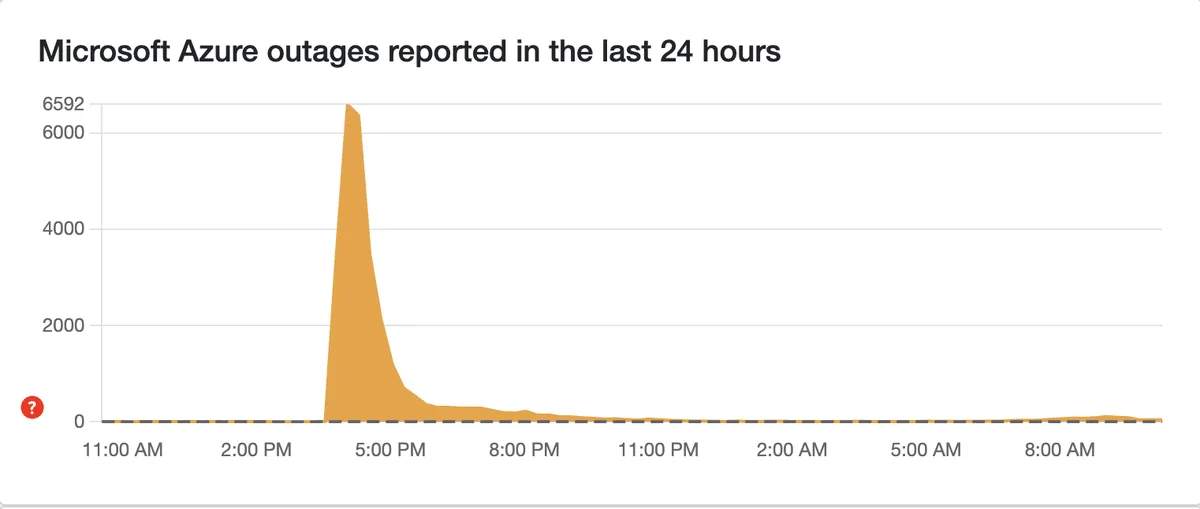
What the October 2025 Azure Front Door incident teaches Salesforce teams
A microsoft servers incident review is useful only when it names the affected Microsoft layer, the time window, and the Salesforce process that depended on it.
Microsoft’s public Azure Post Incident Review for tracking ID YKYN-BWZ states that between 15:41 UTC on October 29, 2025 and 00:05 UTC on October 30, 2025, customers and Microsoft services using Azure Front Door and Azure CDN experienced connection timeout errors and DNS resolution issues. The same PIR lists affected Azure services including Azure App Service, Azure Databricks, Azure Portal, Azure SQL Database, Azure Static Web Apps, Azure Marketplace, and others.
The Salesforce lesson is not to treat every public microsoft servers outage as one event. An integration can fail because of Azure Front Door, DNS, Microsoft Graph, Entra authentication, tenant-specific Microsoft 365 health, your Azure-hosted middleware, or a network path between systems. Each cause needs a different response.
Microsoft 365 outage november 15 2025: how to verify tenant impact
Microsoft servers evidence matters most when dates are unclear. The search phrase microsoft 365 outage november 15 2025 should be handled carefully. A public outage tracker can show user reports, but Microsoft 365 incidents are often tenant-specific or region-specific. The Microsoft 365 admin center Service health page is the source to check before you change Salesforce email, calendar, or Graph integration settings.
If a Salesforce case says users saw Microsoft 365 failures on a date such as November 15, 2025, capture the Microsoft incident ID from Service health, affected service names, start time, end time, and tenant impact. Without that incident ID, the safer conclusion is “external dependency under investigation,” not “Salesforce is down.”
Microsoft azure xbox outage: why consumer signals are not enough
Microsoft servers signals can overlap across consumer and business services. The phrase microsoft azure xbox outage often appears when consumer services and Azure symptoms trend at the same time. Treat that as a clue, not proof. Xbox has its own official status page, Azure has a public status page and Service Health, and Microsoft 365 has tenant health in the admin center.
For Salesforce teams, the practical question is narrower: which endpoint is your org calling, and what did that endpoint return? A Salesforce-to-Microsoft Graph integration should not be triaged from Xbox status alone. Check the Named Credential, OAuth token, endpoint route, response body, and Azure or Microsoft 365 incident record.
Microsoft cyber attack today: separate security alerts from outages
Microsoft servers security triage should stay separate from outage triage. Searches for microsoft cyber attack today usually mix three different things: a confirmed Microsoft security advisory, a customer-specific compromise, and a service outage. Do not assume one from the other. Use the Microsoft Security Response Center and Security Update Guide for vulnerability information, then check your own Entra sign-in logs, Conditional Access events, Defender alerts, and Salesforce Connected App usage.
In Salesforce, a suspected Microsoft account compromise can show up as failed SSO attempts, unusual login IPs, unexpected OAuth grants, or integration users making calls outside normal patterns. Review Login History, Event Monitoring if licensed, connected app policies, and permission set assignments before you rotate secrets or revoke users.
Alaska airlines 365: public examples and root-cause discipline
The query alaska airlines 365 is a good reminder that public reports can name several brands during a broad cloud incident. That does not automatically identify the failing component in your Salesforce architecture. One company might be affected through check-in systems, another through Microsoft 365 sign-in, and another through Azure-hosted APIs.
For incident reviews, record what failed in your org rather than copying public summaries. A useful Salesforce incident note says, for example, “Queueable job MicrosoftCalendarSync received HTTP 503 from the middleware endpoint for 38 minutes; Salesforce core object save operations continued normally.”
How to design Salesforce integrations for Microsoft service failures
A reliable Salesforce-to-Microsoft design assumes that microsoft servers can be slow, partially unavailable, or rate limited. A good microsoft servers design keeps CRM save operations separate from external dependency work. The microsoft servers goal is not to hide the outage. The goal is to prevent one external dependency from blocking unrelated CRM work.
Use Named Credentials and External Credentials
Salesforce Named Credentials let you define the endpoint and authentication details outside Apex code. Current Salesforce guidance also separates the endpoint definition from External Credentials, which describe how Salesforce authenticates to the external system and which permission sets or profiles can use the credential.
For Microsoft integrations, avoid hardcoded tokens, client secrets, and endpoint URLs in Apex. Use a Named Credential such as Microsoft_Graph or a gateway-specific credential such as Microsoft_Health_Probe. Then restrict access through permission sets and review who can manage credentials in Setup.
Set timeouts deliberately
Apex lets you set callout timeouts in milliseconds. Salesforce documents a maximum callout timeout of 120,000 milliseconds and a cumulative callout timeout limit of 120 seconds per transaction. That means one slow Microsoft endpoint can consume most of the transaction budget if you leave callouts unplanned.
In synchronous user flows, keep timeouts short and provide a clear message. In background jobs, use Queueable Apex or Batch Apex, store the failure, and retry later with a limit. Do not put repeated callouts inside loops that process large record sets.
Return a controlled status to Lightning Web Components
The following Apex example checks a microsoft servers health endpoint through a Named Credential. In production, point the Named Credential to your Microsoft Graph gateway, Azure Function, API Management endpoint, or monitoring endpoint. The method returns a small status object so LWC or Flow screens can show a clear message without exposing internal exception details.
public with sharing class MicrosoftServiceProbe {
    public class ProbeResult {
        @AuraEnabled public String state { get; set; }
        @AuraEnabled public Integer statusCode { get; set; }
        @AuraEnabled public String message { get; set; }
        @AuraEnabled public Datetime checkedAt { get; set; }
    }

    @AuraEnabled(cacheable=false)
    public static ProbeResult checkEndpoint() {
        ProbeResult result = new ProbeResult();
        result.checkedAt = System.now();

        HttpRequest request = new HttpRequest();
        request.setEndpoint('callout:Microsoft_Health_Probe/v1/health');
        request.setMethod('GET');
        request.setTimeout(10000);

        try {
            HttpResponse response = new Http().send(request);
            result.statusCode = response.getStatusCode();

            if (response.getStatusCode() >= 200 && response.getStatusCode() < 300) {
                result.state = 'HEALTHY';
                result.message = 'Microsoft dependency responded successfully.';
            } else if (response.getStatusCode() == 429 || response.getStatusCode() >= 500) {
                result.state = 'DEGRADED';
                result.message = 'Microsoft dependency is rate limited or unavailable. Retry later.';
            } else {
                result.state = 'ACTION_REQUIRED';
                result.message = 'Microsoft dependency returned an authentication or request error.';
            }
        } catch (System.CalloutException ex) {
            result.state = 'UNAVAILABLE';
            result.message = 'Callout failed before a response was received.';
        }

        return result;
    }
}
This microsoft servers pattern avoids exposing exception text to users. If you need operational detail, write a separate integration log record with the endpoint alias, response code, correlation ID, and job ID. Keep sensitive headers and tokens out of logs.
Test Microsoft callout handling with HttpCalloutMock
Salesforce requires test methods for deployment, and Apex tests cannot make real HTTP callouts. Use Test.setMock with HttpCalloutMock to test outage paths, success paths, and authentication paths. Salesforce’s Apex Developer Guide documents this pattern for testing HTTP callouts with HttpCalloutMock, and Trailhead covers REST callouts in Apex Integration Services.
@IsTest
private class MicrosoftServiceProbeTest {
    private class HealthyMock implements HttpCalloutMock {
        public HttpResponse respond(HttpRequest request) {
            System.assertEquals('GET', request.getMethod());

            HttpResponse response = new HttpResponse();
            response.setStatusCode(200);
            response.setBody('{"status":"ok"}');
            response.setHeader('Content-Type', 'application/json');
            return response;
        }
    }

    private class DegradedMock implements HttpCalloutMock {
        public HttpResponse respond(HttpRequest request) {
            HttpResponse response = new HttpResponse();
            response.setStatusCode(503);
            response.setBody('{"status":"degraded"}');
            return response;
        }
    }

    @IsTest
    static void returnsHealthyForHttp200() {
        Test.setMock(HttpCalloutMock.class, new HealthyMock());

        Test.startTest();
        MicrosoftServiceProbe.ProbeResult result = MicrosoftServiceProbe.checkEndpoint();
        Test.stopTest();

        System.assertEquals('HEALTHY', result.state);
        System.assertEquals(200, result.statusCode);
    }

    @IsTest
    static void returnsDegradedForHttp503() {
        Test.setMock(HttpCalloutMock.class, new DegradedMock());

        Test.startTest();
        MicrosoftServiceProbe.ProbeResult result = MicrosoftServiceProbe.checkEndpoint();
        Test.stopTest();

        System.assertEquals('DEGRADED', result.state);
        System.assertEquals(503, result.statusCode);
    }
}
Best practices for Microsoft servers and Salesforce resilience
Microsoft servers resilience is mainly about isolation, evidence, and controlled retries.
Use these practices when microsoft servers are an external dependency for Salesforce. They help admins and developers avoid broad production changes during an outage.
- Decouple save operations from callouts. Let users save Salesforce records even when a Microsoft enrichment step fails. Use async jobs to complete the enrichment later.
- Store retry state. Track attempt count, next retry time, last HTTP status, and last failure reason on an integration log object.
- Respect rate limits. If Microsoft returns 429 or a retry header, pause retries instead of creating a job storm.
- Use idempotency keys. When creating Microsoft-side records, store a request key so a retry does not create duplicates.
- Separate user-facing and admin-facing messages. Users need a plain message. Admins need endpoint, status code, correlation ID, and timestamp.
- Keep emergency switches narrow. A custom metadata flag can pause one integration job without disabling unrelated flows or triggers.
- Review permissions after incidents. If the issue involved identity or OAuth, inspect Connected Apps, permission sets, integration users, and token revocation steps.
Common errors with Microsoft servers in Salesforce integrations
Most microsoft servers integration errors fall into a small set of patterns. The table below maps each symptom to a Salesforce action.
| Error pattern | Likely cause | Salesforce response |
|---|---|---|
System.CalloutException: Read timed out |
Endpoint is slow, network path is degraded, or timeout is too low for the operation. | Shorten synchronous work, move processing async, log the attempt, and retry with limits. |
| HTTP 401 or 403 | Expired token, wrong scope, permission change, Conditional Access block, or disabled integration user. | Check Named Credential authentication, External Credential principal access, Entra logs, and connected app policy. |
| HTTP 429 | Microsoft service is rate limiting requests. | Honor retry guidance, reduce concurrency, and queue work instead of retrying immediately. |
| HTTP 502, 503, or 504 | Gateway, service, or upstream dependency problem. | Check Azure Service Health, Microsoft 365 health, and middleware logs. Keep Salesforce transactions independent where possible. |
| SSO login failure | Identity provider, certificate, SAML, OIDC, MFA, or Conditional Access issue. | Compare Salesforce Login History with Entra sign-in logs. Keep a break-glass Salesforce admin account that does not rely on the affected identity provider. |
Runbook for a suspected Microsoft outage affecting Salesforce
A microsoft servers runbook should let a support engineer make the same decisions at 2 AM that an architect would make during the day. Keep it short enough to use during pressure.
- Record the first user report time, Salesforce org ID, affected feature, and business process.
- Check whether users can log in directly to Salesforce without Microsoft SSO.
- Check Microsoft 365 Service health, Azure Service Health, Azure public status, and MSRC if the report mentions security.
- Check Salesforce Trust and org-level logs for the same time window.
- Review Apex Jobs, failed flow interviews, integration logs, Named Credential authentication status, and middleware telemetry.
- Pause only the failing integration path if it is causing retries, duplicate records, or user-blocking errors.
- Post a status update that separates confirmed facts from assumptions.
- After recovery, write an incident review with root cause, detection gap, user impact, corrective action, and owner.
Related SalesforceTutorial resources
For implementation detail, continue with Salesforce integration patterns, Salesforce Named Credentials setup, Apex callouts in Salesforce, Queueable Apex retry design, and Salesforce security model basics.
Frequently Asked Questions
Are microsoft servers the same as Salesforce servers?
No. Salesforce and Microsoft operate separate cloud services, and microsoft servers incidents do not automatically mean Salesforce core services are unavailable. A Salesforce org can be available while Microsoft 365, Entra ID, Microsoft Graph, or Azure-hosted middleware has an incident. The right response is to verify both Salesforce and Microsoft health before changing production configuration.
How do I check if a Microsoft 365 outage is affecting Salesforce users?
For microsoft servers tied to email and calendar, check Microsoft 365 Service health in the admin center, then compare it with Salesforce Login History, email integration logs, flow failures, and Apex callout logs. If the issue affects only users who authenticate through Entra ID or use Microsoft email/calendar features, treat Microsoft 365 as a likely dependency while you continue verifying Salesforce logs.
What should Salesforce developers do during a microsoft azure xbox outage?
Developers should not use Xbox status as proof of a Salesforce integration failure. Check the exact endpoint called by Salesforce, the HTTP response, the Named Credential, Azure Service Health, and Microsoft 365 Service health. Then pause or retry only the affected integration path.
Does microsoft cyber attack today mean my Salesforce org is compromised?
No. A Microsoft security advisory, a Microsoft service outage, and a customer-specific compromise are different events. If you suspect account compromise, review Microsoft security alerts, Entra sign-in logs, Salesforce Login History, Connected Apps, OAuth usage, and permission changes before making access decisions.
Should Apex callouts to Microsoft run synchronously?
Use synchronous Apex callouts only when the user needs the response immediately and the operation is small. For sync jobs, enrichment, file generation, and retries, use asynchronous processing so a Microsoft dependency does not block the Salesforce transaction.