Datorama is the former name for Salesforce Marketing Cloud Intelligence, a marketing analytics workspace used to connect campaign, media, web, CRM, and commerce data. In Salesforce projects, the main job is not simply building dashboards; it is designing reliable data streams, mapping source fields to the Marketing Cloud Intelligence data model, and keeping performance metrics consistent across channels.
This guide explains what is Datorama, how Salesforce Datorama implementations work, how data gets into the platform, where mapping and harmonization can fail, and how to compare Datorama alternatives before you select an analytics stack.
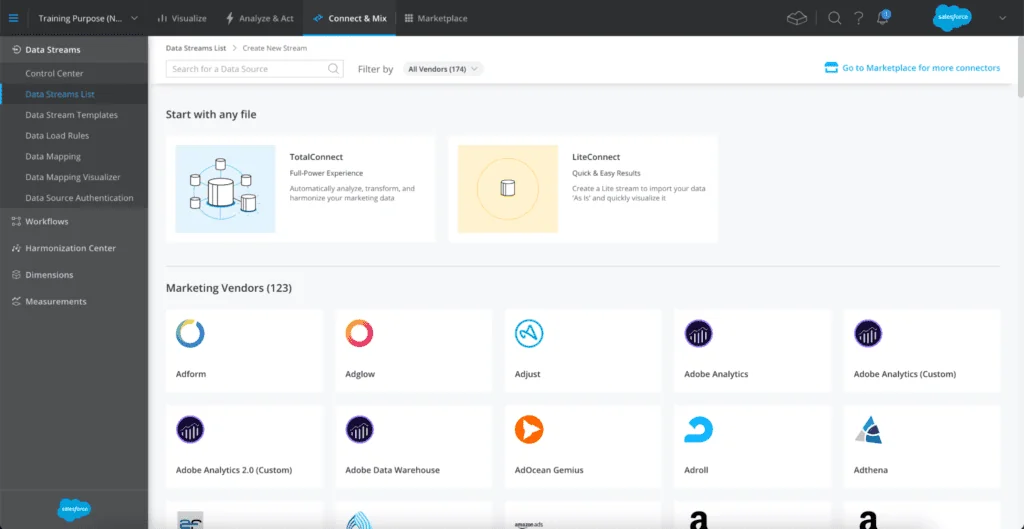
Datorama: what it means in Salesforce
Salesforce acquired the product under the Datorama name, and Salesforce documentation now uses Marketing Cloud Intelligence for the same product family. You will still see the old name in URLs, skills, resumes, legacy workspaces, and business conversations. In this article, Datorama means Marketing Cloud Intelligence unless a section calls out a different Salesforce product.
What is Datorama in practical terms?
What is Datorama for an implementation team? It is a marketing data layer and reporting workspace. Teams use it to bring in data from ad platforms, Marketing Cloud Engagement, Account Engagement, web analytics tools, commerce platforms, CRM exports, agencies, and offline files. After ingestion, the team maps fields into a shared model so that dashboards can compare spend, impressions, clicks, conversions, revenue, and other KPIs without rebuilding every report from scratch.
In enterprise orgs, the hard part is usually data ownership. A paid media team may own campaign names, an agency may own cost files, Salesforce Admins may own Campaign and Campaign Member data, and a marketing analytics team may own the dashboard layer. Datorama works only when those teams agree on naming standards, source refresh frequency, and metric definitions.
Marketing Cloud Intelligence naming and current Salesforce direction
Marketing Cloud Intelligence is documented by Salesforce as a product for connecting, harmonizing, visualizing, and acting on marketing data. Salesforce also documents Marketing Intelligence in Marketing Cloud Next, which uses Data 360 and Tableau. That naming can confuse buyers and admins, so confirm the SKU, workspace, and user interface in your Salesforce contract before planning a migration or new build.
Use the official Salesforce Help topic Integrate and Analyze Marketing Data with Marketing Cloud Intelligence as the baseline product reference. For hands-on learning, Salesforce Trailhead provides the Marketing Cloud Intelligence for Marketing module.
Salesforce Datorama implementation scope
A Salesforce Datorama implementation normally includes five workstreams:
- Source inventory: list every platform, owner, refresh schedule, credential, and required field.
- Data ingestion: choose API connectors, TotalConnect, LiteConnect, Granular Data Center, or an upstream ETL process.
- Data model design: map dimensions and measurements to the Marketing Cloud Intelligence model.
- Harmonization: normalize campaign names, regions, channels, products, and business units.
- Dashboard and insight delivery: build dashboards, scheduled reports, alerts, and operating reviews.
How Datorama data ingestion works
Datorama data ingestion is built around data streams. Salesforce describes a data stream as a connection to a data source, ranging from an API connection to a custom flat-file source. Use the official Create Data Streams in Marketing Cloud Intelligence help topic when you choose between API connectors, TotalConnect, LiteConnect, and Granular Data Center. The selection you make at ingestion time affects mapping effort, data refresh, row volume, and support ownership.
| Connection option | Best fit | Admin decision point | Common risk |
|---|---|---|---|
| API connector | Supported ad, analytics, commerce, CRM, or marketing platform | Use it when the connector includes the fields and date grain you need | OAuth credentials expire or the connector omits a source-specific field |
| TotalConnect | Scheduled files or custom source exports | Use it when no connector fits or file transformation is required | Headers, date formats, or column names change without notice |
| LiteConnect | One-off file analysis or isolated proof of concept | Use it when you do not want to map the file into the shared model | Users treat a temporary upload as a governed source |
| Granular Data Center | High-volume raw marketing data | Use it when row volume and detail level require a different storage pattern | Teams load data without defining business questions first |
API connectors for Marketing Cloud Intelligence
Start with an API connector when Salesforce provides one for the source system and the connector returns the reporting grain required by the business. API connectors reduce manual file handling and usually make credential ownership clearer. You still need to check field availability, date windows, rate behavior, and how the connector handles deleted or renamed campaigns.
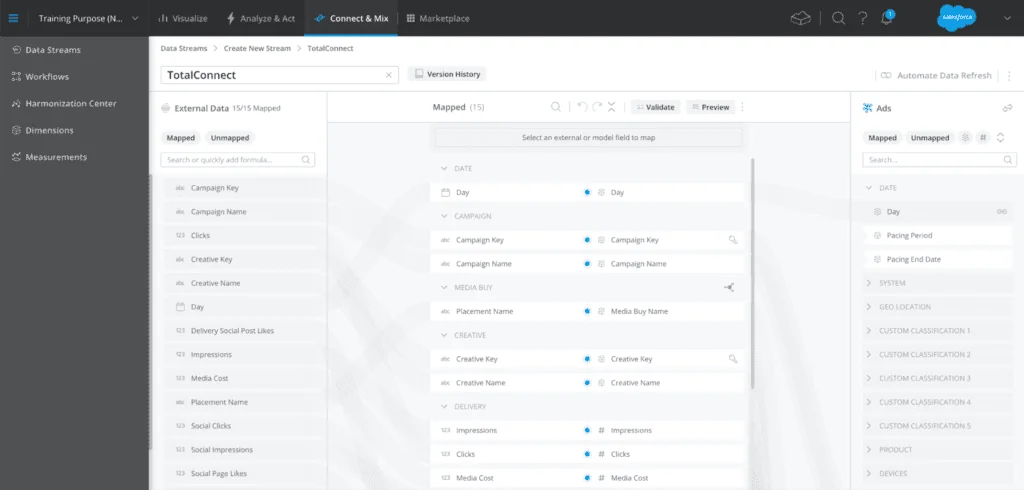
Before activating an API data stream, document the following items:
- The source account, business unit, ad account, or property being connected.
- The user or integration account that owns authentication.
- The earliest date required for backfill.
- The dimensions and measurements expected in the first dashboard.
- The refresh schedule and who receives failure alerts.
TotalConnect for file-based marketing data
TotalConnect is the right option when the source data arrives as files or when the standard connector does not expose the exact fields you need. Salesforce Help describes TotalConnect as the way to create a data stream when you need to upload data from a source and no API connector exists. It can be simple when the file is stable, but it becomes fragile when the upstream export changes column order, date format, naming convention, or currency handling.
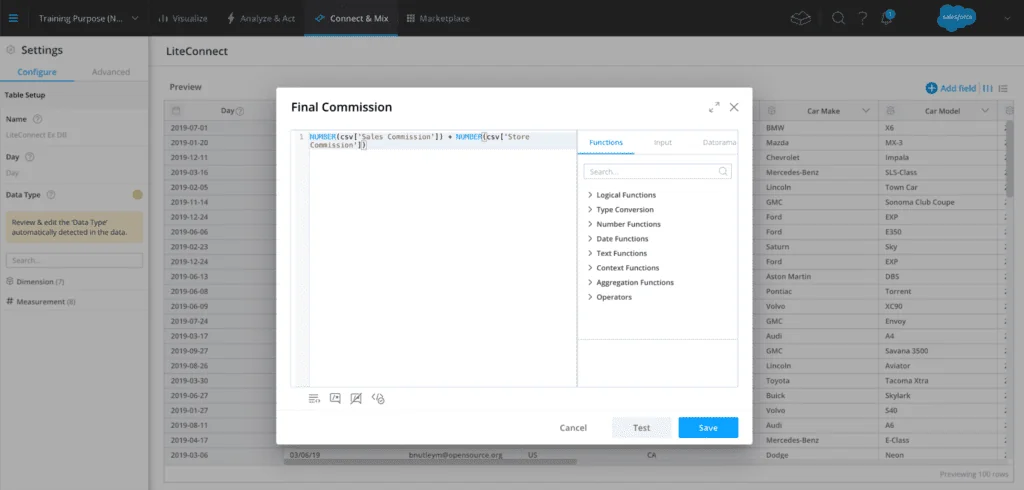
Use this pre-import checklist for every TotalConnect source:
- Header contract: keep source column names stable and version changes through a release note.
- Date standard: store dates in one documented format and timezone.
- Currency rule: include currency code when spend crosses markets.
- Primary grain: define whether one row means campaign-day, ad-day, creative-day, order, lead, or another grain.
- Reload plan: confirm whether historical files can be reloaded if mapping changes.
The following example shows a small file contract for a campaign-day import. The field names are plain on purpose; use names your source teams can keep stable.
report_date,campaign_external_id,campaign_name,channel,market,currency,spend,impressions,clicks,conversions
2026-05-31,cmp_10091,2026_05_US_Search_Brand_Awareness,paid_search,US,USD,1280.42,98213,4180,219
2026-05-31,cmp_10092,2026_05_UK_Social_Retargeting_Demo,paid_social,UK,GBP,771.20,65492,2310,144
LiteConnect for isolated analysis
LiteConnect fits ad hoc analysis when a user needs to upload a file and visualize it without deciding how it fits the shared Marketing Cloud Intelligence data model. This can help during discovery or a proof of concept. Do not use it as a shortcut for governed reporting when the business expects the data to combine with other dashboards, because that decision creates later rework.
Bulk API and SOQL when the source is Salesforce CRM
When campaign influence, leads, opportunities, or Campaign Member data must feed Datorama, export the data from Salesforce CRM with a scheduled integration pattern. For large result sets, Salesforce Developer documentation points teams to Bulk API 2.0 query jobs for asynchronous SOQL processing. Use the SOQL reference when you design the query. Do not place large campaign exports inside synchronous Apex jobs or UI-triggered automations.
Example SOQL for a CRM campaign export:
SELECT
    Id,
    CampaignId,
    Campaign.Name,
    LeadId,
    ContactId,
    Status,
    HasResponded,
    CreatedDate
FROM CampaignMember
WHERE CreatedDate = LAST_N_DAYS:90
Governor limit note: run this as an integration query or Bulk API 2.0 query job for large volumes. If you query CRM data inside Apex for a small operational process, keep the SOQL outside loops and filter on indexed fields where possible. Salesforce SOQL does not support arbitrary SQL joins; relationship traversal must follow defined object relationships.
How to model data in Marketing Cloud Intelligence
The Marketing Cloud Intelligence data model is marketing-oriented, so fields such as campaign, media buy, creative, placement, spend, impressions, clicks, and conversion metrics need consistent meaning. Mapping is where many Datorama builds succeed or fail. A dashboard can hide bad mapping for a few weeks, but the problem appears later when stakeholders compare channels or ask why one campaign has two spend totals.
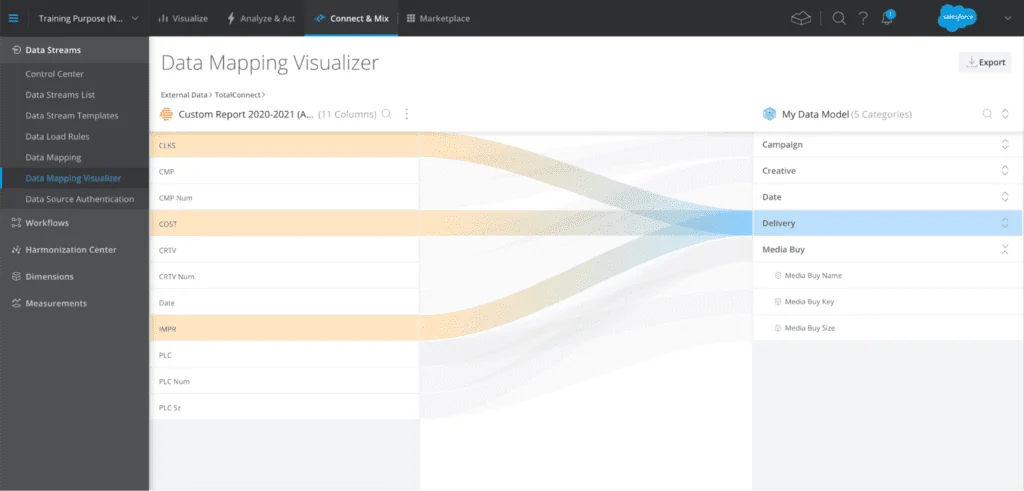
Map source fields to the data model
Salesforce Help documents source data mapping as the process that connects uploaded source fields to Marketing Cloud Intelligence fields. In a production workspace, do not let every data stream invent its own field meaning. Create a mapping dictionary that defines each metric and identifies the source owner.
A useful mapping dictionary includes these columns:
| Dictionary field | Example | Why it matters |
|---|---|---|
| Source column | cost_micros | Shows the exact field from the upstream platform |
| Datorama field | Media Cost | Shows the shared model field used by dashboards |
| Transformation | Divide by 1,000,000 | Prevents unit errors in spend reporting |
| Owner | Paid Search Operations | Identifies who approves field changes |
| Validation check | Monthly spend within 1% of source UI | Defines how the team catches mapping defects |
Use Data Mapping Visualizer for review
The Data Mapping Visualizer helps teams inspect how source fields connect to the Marketing Cloud Intelligence model. Use it in design reviews, not only during troubleshooting. In enterprise orgs, the review should include the marketing analyst, channel owner, and Salesforce architect because a mapping change can affect dashboards, extracts, and executive reports.
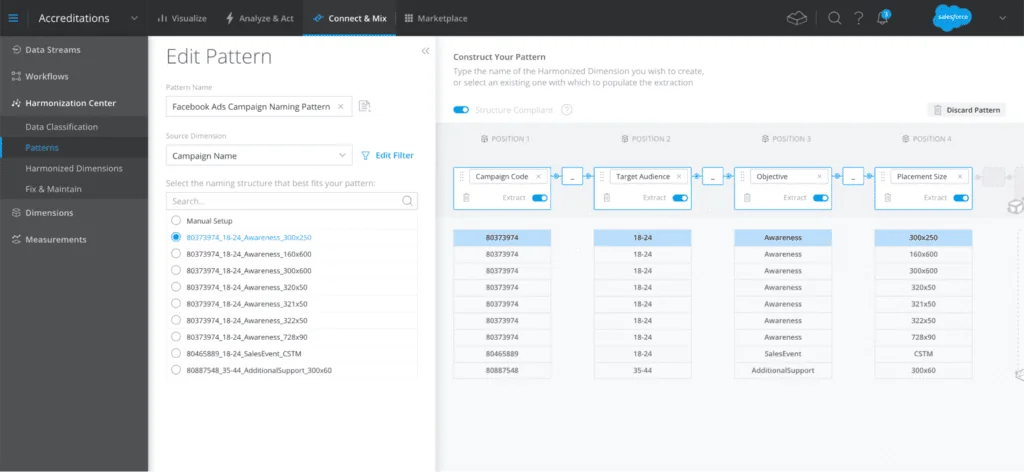
Mapping changes normally affect future processing. If you need to correct historical data, plan a controlled reload and verify backups or source-file retention first. Salesforce also documents a 15-year processing window in TotalConnect troubleshooting, so do not assume old historical marketing data can always be loaded without date-range validation.
How to harmonize campaigns in Datorama
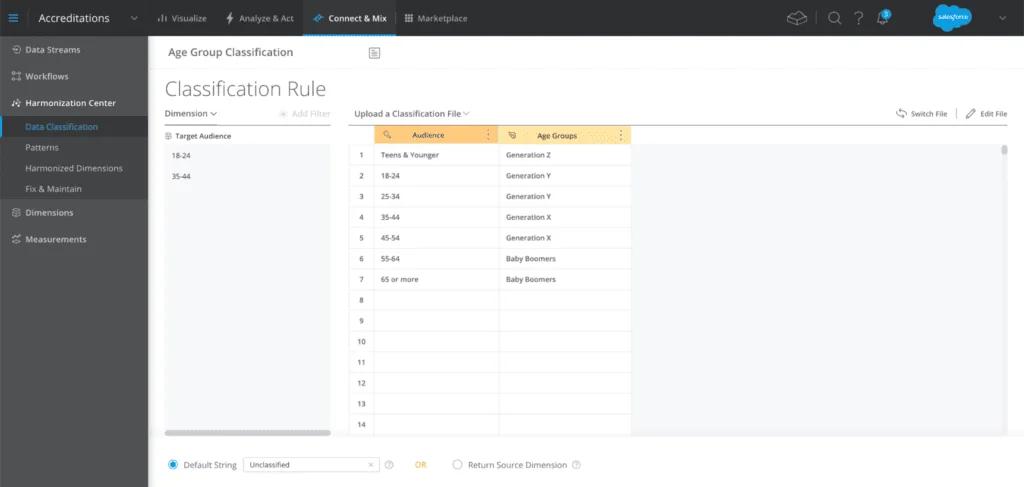
Harmonization turns separate platform fields into shared reporting dimensions. In Datorama, this often means parsing campaign names, landing page URLs, media buy names, product IDs, or market codes into fields that dashboards can group and filter. Salesforce documents harmonization with patterns and classification rules, and those tools work best when teams agree on naming rules before campaigns launch.
Build a naming convention before dashboard design
Do not begin with widgets. Begin with the names and codes that will feed the widgets. A paid media naming convention can include year, month, market, channel, objective, audience, and product. Keep the pattern short enough for ad platforms, but strict enough for parsing.
Pattern:
YYYY_MM_MARKET_CHANNEL_OBJECTIVE_PRODUCT

Example:
2026_06_US_PAIDSEARCH_DEMANDGEN_CRM
This small Python check can run before a scheduled file is delivered to TotalConnect. It is not Salesforce code; it is an upstream data quality guard that prevents bad campaign names from becoming reporting defects.
import re

CAMPAIGN_PATTERN = re.compile(
    r"^20[0-9]{2}_(0[1-9]|1[0-2])_[A-Z]{2}_[A-Z0-9]+_[A-Z0-9]+_[A-Z0-9]+$"
)

def validate_campaign_name(name: str) -> bool:
    return bool(CAMPAIGN_PATTERN.match(name or ""))

sample = "2026_06_US_PAIDSEARCH_DEMANDGEN_CRM"

if not validate_campaign_name(sample):
    raise ValueError(f"Campaign name does not match the approved pattern: {sample}")
Use classification rules for business groupings
Campaign names should carry the most specific value that the activation team can maintain. Classification rules can then group that value into reporting levels such as region, portfolio, product family, or lifecycle stage. For example, the campaign name can contain country code while a classification table maps countries to regions. This keeps campaign names shorter and keeps regional logic in a governed table.
| Raw value | Classification output | Dashboard use |
|---|---|---|
| US | North America | Regional spend and pipeline reporting |
| GB | Europe | Market comparison dashboard |
| IN | Asia Pacific | Budget pacing and campaign response view |
How to build dashboards and insights in Marketing Cloud Intelligence
Dashboard design should follow the decisions users make. A channel manager needs daily pacing, spend, and conversion health. A marketing director needs cross-channel budget and outcome reporting. Sales leadership may need campaign response, sourced pipeline, and influenced opportunity metrics. Build separate dashboard paths instead of forcing every persona into one page.
Recommended dashboard structure
| Dashboard page | Primary users | Core metrics | Design note |
|---|---|---|---|
| Executive overview | CMO, VP Marketing, Finance | Spend, revenue, pipeline, ROI proxy, pacing | Use stable definitions and fewer filters |
| Channel performance | Paid media, email, social, web teams | Spend, impressions, clicks, CTR, conversion rate, cost per conversion | Show trend and breakdown by campaign family |
| Campaign operations | Marketing operations and agencies | Mapping errors, missing classifications, stale data streams | Make data quality visible |
| Sales alignment | Sales leaders and RevOps | Campaign responses, leads, opportunities, pipeline stage | Separate sourced and influenced metrics |
Einstein Marketing Insights in the analytics workflow
Salesforce documents Einstein Marketing Insights as a feature that analyzes marketing data and shows factors that affect performance. Treat these insights as investigation prompts, not as automatic strategy decisions. A drop in conversions can come from tracking outages, budget caps, seasonality, targeting changes, or source-system delays. The analyst should verify the cause before sending action requests to channel owners.
Security and governance best practices for Datorama
Datorama governance is part access control, part data quality, and part operating model. A workspace may contain agency spend, campaign outcomes, CRM pipeline, and regional budgets. That data should not be open to every user by default.
- Use least privilege: give users only the workspace, dashboard, and administration access required for their role.
- Separate build and review: let implementation users configure data streams, but require business owners to approve mapping and dashboard definitions.
- Control credentials: use integration users where the source platform supports them, and document password or OAuth ownership.
- Monitor failed streams: assign owners for failed refreshes, expired tokens, and changed source schemas.
- Version naming rules: store naming conventions, classification files, and mapping dictionaries in a controlled repository.
- Validate financial metrics: reconcile spend and revenue against source systems before executive launch.
Datorama alternatives for Salesforce teams
Datorama alternatives should be compared by use case, not by a feature checklist alone. Marketing Cloud Intelligence is strongest when the requirement centers on marketing data ingestion, harmonization, and cross-channel performance reporting. Other Salesforce and analytics tools may fit better when the requirement is CRM pipeline reporting, customer unification, product analytics, or broad business intelligence.
Datorama alternatives inside Salesforce
| Alternative | Use it when | Do not use it as a direct replacement when |
|---|---|---|
| Salesforce Reports and Dashboards | The data already lives in core Salesforce objects and users need CRM operational reporting | You need to combine multiple ad platforms and external media cost files |
| CRM Analytics | Sales, service, revenue, or custom CRM analytics need dashboards, lenses, and Salesforce-native datasets | The primary challenge is marketing connector coverage and media data harmonization |
| Tableau | Business intelligence teams need broad visualization, exploration, and governed analytics beyond marketing | Marketing operations users need packaged marketing ingestion patterns first |
| Data 360 | The priority is customer profile unification, segmentation, activation, and data model objects | The main deliverable is paid media performance reporting by campaign and creative |
| Marketing Intelligence in Marketing Cloud Next | Your org is adopting Marketing Cloud Next, Data 360, and Tableau-based marketing intelligence | You are maintaining an existing Marketing Cloud Intelligence workspace and need parity planning first |
Related SalesforceTutorial references: read Salesforce Marketing Cloud overview for product context, Salesforce Data Cloud guide for customer data unification, CRM Analytics guide for Salesforce analytics, Salesforce reports and dashboards for CRM reporting, and Tableau certification guide if your team is building Tableau skills.
Implementation checklist for Salesforce Datorama projects
Use this checklist before you move from discovery to build.
- Confirm product scope: verify whether the project uses Marketing Cloud Intelligence, Intelligence Reports for Engagement, Marketing Intelligence in Marketing Cloud Next, Tableau, or another Salesforce analytics product.
- List every source: include owner, platform, credential model, export method, grain, refresh frequency, and historical backfill range.
- Define metrics: document spend, click, conversion, revenue, lead, MQL, SQL, pipeline, and ROI calculations before dashboard work starts.
- Choose ingestion method: use API connectors when they fit; use TotalConnect or upstream ETL when custom files or transformations are needed.
- Approve mappings: review source-to-model mapping with business users before loading production history.
- Set naming standards: enforce campaign naming before launch, not after reporting breaks.
- Build data quality views: show stale streams, missing classifications, unmapped fields, and metric outliers.
- Plan reloads: decide how historical corrections will be made and who approves them.
- Secure access: separate admin, builder, analyst, executive, and agency roles.
- Run parallel validation: compare Datorama dashboards with source-platform reports for at least one full reporting period.
Common errors with Datorama implementations
- Starting with dashboard mockups only: dashboards fail when source data lacks stable grain and naming.
- Mixing sourced and influenced revenue: keep attribution definitions separate and label them clearly.
- Ignoring timezone rules: ad platforms, websites, and Salesforce CRM may not use the same timezone.
- Overloading campaign names: long names break platform limits and user discipline; use classification files for groupings.
- No reload strategy: mapping corrections may require historical reloads, so source retention matters.
- Weak credential ownership: personal user credentials create avoidable outages when users leave or reset passwords.
Frequently Asked Questions
What is Datorama called now?
Datorama is now generally referred to as Marketing Cloud Intelligence in Salesforce documentation. Many teams still use the Datorama name because older workspaces, skills, and job descriptions kept the original product name.
Is Marketing Cloud Intelligence the same as Intelligence Reports for Engagement?
No. Intelligence Reports for Engagement is focused on reporting for Marketing Cloud Engagement data. Marketing Cloud Intelligence is a broader analytics workspace for connecting, mapping, harmonizing, visualizing, and analyzing marketing data from many sources.
When should I use API Connect instead of TotalConnect?
Use API Connect when Salesforce provides a maintained connector for the source and the connector exposes the fields and granularity you need. Use TotalConnect when the source is file-based, custom, or not available through a connector.
What are good Datorama alternatives inside Salesforce?
Common Salesforce-side alternatives are Tableau, CRM Analytics, native Salesforce reports and dashboards, Data 360, and Marketing Intelligence in Marketing Cloud Next. The right option depends on whether the project is media performance reporting, CRM pipeline analytics, customer unification, or general business intelligence.
Can Salesforce Admins implement Datorama without developers?
Admins and marketing operations users can configure many data streams, mappings, dashboards, and harmonization rules without Apex. Developer help is still useful for source-system exports, Bulk API jobs, custom webhooks, Python-based automation, and data quality checks.