Salesforce updates are seasonal platform changes, release updates in Setup, and product-specific changes that can affect configuration, automation, Apex, integrations, and user experience. For admins and developers, the safe approach is to identify impacted features early, test in sandbox, deploy fixes through your normal pipeline, and activate required updates before Salesforce enforces them.
This guide explains how to track Salesforce release changes, how to check the salesforce current version, and how to build release management in salesforce so updates do not surprise your users. The examples assume an enterprise org with multiple sandboxes, source control, and a governed deployment process, but the same checklist works for smaller orgs.
What are Salesforce Updates?
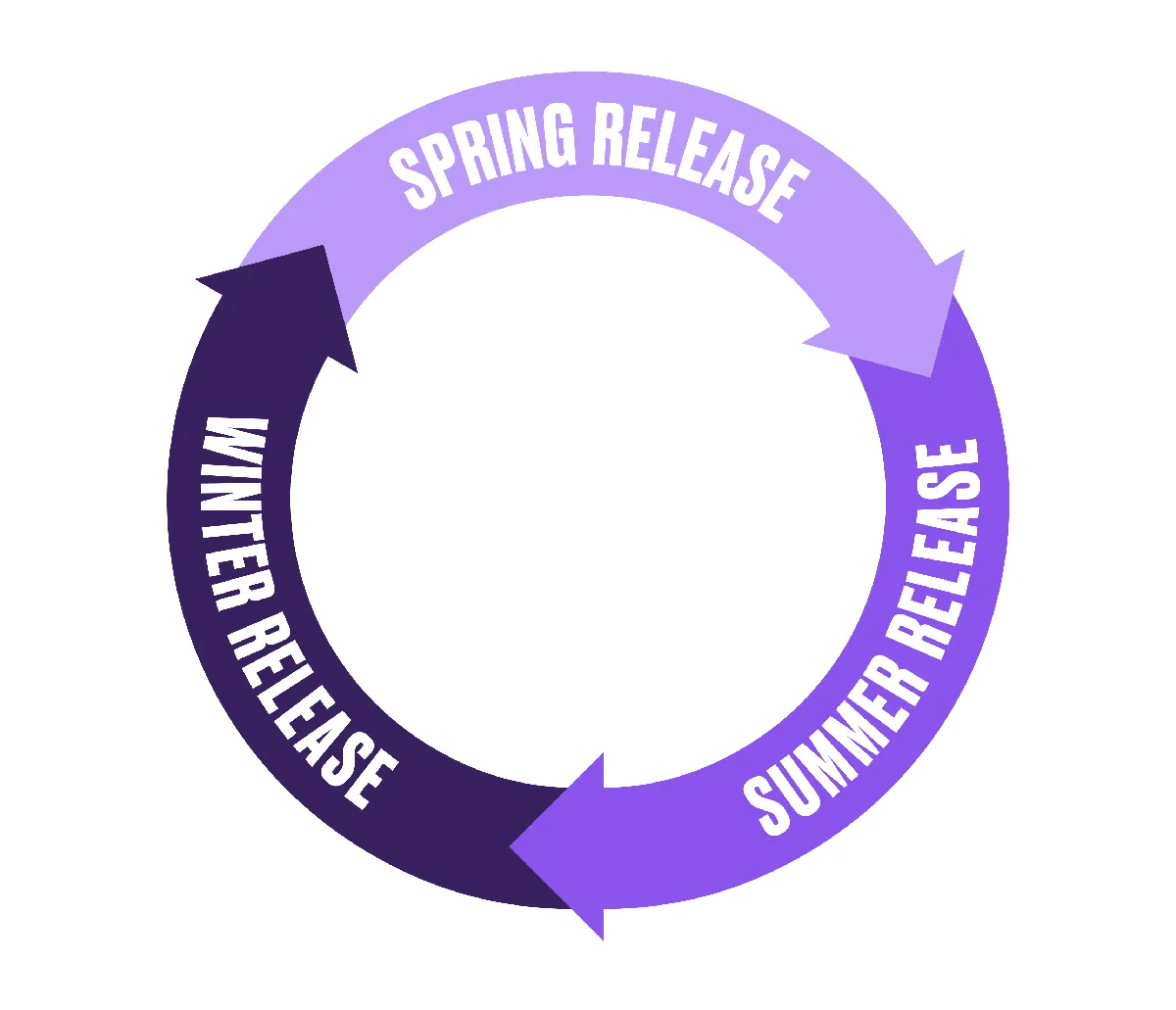
salesforce updates include the three major seasonal releases each year, release updates listed in Setup, monthly release note changes, security changes, feature retirements, and product-specific upgrades for clouds such as Sales Cloud, Service Cloud, Experience Cloud, Data Cloud, and Marketing Cloud. Seasonal releases usually bring new features and behavior changes. Release updates are more targeted changes that Salesforce exposes on the Release Updates page in Setup, often with status, testing guidance, and an enforcement timeline.
In production work, do not treat every release note as equal. A new dashboard feature might only need enablement and training. A security release update can change whether users can run flows, access Apex-backed features, or authenticate through an older configuration. The release owner should separate announcements into three groups: no action, admin configuration, and delivery work that requires development, testing, or deployment.
| Update type | Where to review it | Typical owner | Action needed |
|---|---|---|---|
| Seasonal release | Salesforce Release Notes and sandbox preview | Admin, architect, product owner | Review feature changes, test key processes, update training |
| Release update in Setup | Setup > Release Updates | Admin, developer, security owner | Evaluate impact, run test activation when available, prepare remediation |
| Security or access change | Release Notes, Setup, security documentation | Security admin, platform owner | Check profiles, permission sets, sharing, CRUD, FLS, and automation access |
| API or developer change | Developer docs, release notes, CLI output | Developer, integration owner | Test Apex, LWC, integrations, managed packages, and CI jobs |
A salesforce updates review should finish with a decision: no action, configuration change, code change, permission change, vendor follow-up, or user communication. That decision keeps salesforce updates out of informal chat threads and inside your change process.
Use the official Salesforce Release Notes as the primary source for release details. Use the Salesforce Release Updates Help page to understand the Setup-based release update mechanism. Trailhead also provides a Salesforce Release Readiness Strategies module for admins who need a repeatable process.
How do you check the Salesforce current version?
Salesforce current version for June 2026
As of June 2, 2026, the public Release Notes site lists Summer ’26 as the active core platform release documentation. The practical answer to salesforce current version still depends on your instance because Salesforce rolls releases through scheduled maintenance windows. Check your own org before planning a deployment.
- Open your production org and note the instance from the URL or from Setup > Company Information.
- Go to Salesforce Status or My Trust Center and search that instance for maintenance and release windows.
- Open the current Release Notes and filter by the clouds and features your org uses.
- In Setup, search for Release Updates and review updates with pending enforcement or testing status.
Document the salesforce current version in every release readiness note because sandbox and production dates can differ. The phrase salesforce current version should not be answered from memory during a rollout week. If a stakeholder asks for the salesforce current version, answer with both the named release and the org context. For example: “Production is on Summer ’26 after the June release window, but our full sandbox received preview earlier, so testing must use the sandbox result, not a generic calendar date.”
Salesforce release schedule 2025 and what changed after it
The salesforce release schedule 2025 followed the normal seasonal pattern: Spring ’25, Summer ’25, and the Winter ’26 release that began reaching orgs in the second half of 2025. The named release does not always match the calendar year, so Winter ’26 belongs to the 2025 operational planning cycle for many teams. When you document the salesforce release schedule 2025 in a change calendar, include the actual instance date from Salesforce Status rather than only the release name.
The same problem appears when teams reuse a salesforce release schedule 2025 calendar for later planning without checking the current instance window. For 2026 planning, keep the same habit. The release name tells you the feature set; the instance maintenance calendar tells you when users see it. This distinction matters when you run regression testing, schedule production deployments, or communicate changes to support teams.
How to review Salesforce Updates in Setup
The Setup page is the daily control point for salesforce updates that require action. Review salesforce updates in Setup at the start of each seasonal cycle and again before the production release window. From Setup, enter Release Updates in Quick Find, then open each item that is relevant to your org. Capture the update name, status, enforcement date if shown, affected features, Salesforce guidance, test option, owner, and internal decision.
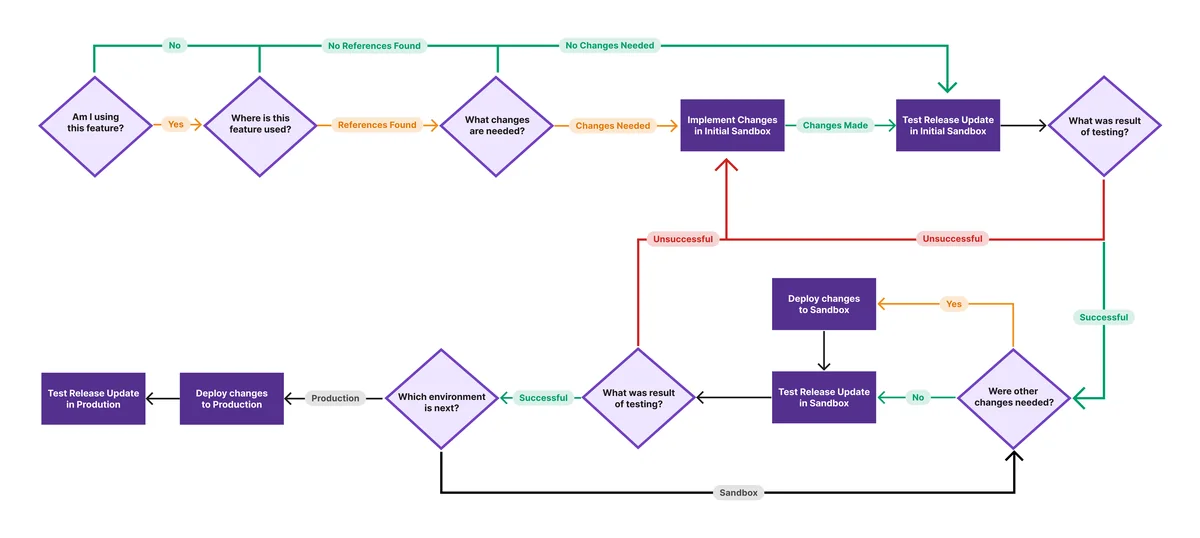
For regulated or high-change orgs, schedule a weekly salesforce updates review during release season. Do not activate a release update in production first. Use a sandbox with enough metadata and data to represent real behavior. If the update supports a test activation, run it in a lower sandbox, test the impacted processes, and document the result. If the update does not support a test activation, follow the test instructions in the official release note and create a regression test for the affected feature area.
Salesforce updates release register fields
A release register gives every salesforce updates item the same review path. Keep the register short enough that admins will maintain it during every seasonal release.
| Register field | What to capture |
|---|---|
| salesforce updates owner | Person accountable for the decision and test evidence |
| salesforce updates impact | Objects, flows, Apex, integrations, permissions, pages, and packages touched by the update |
| salesforce updates test evidence | Sandbox name, user profile, test data, defect link, and pass or fail result |
| salesforce updates production decision | Activate, defer, remediate first, ask vendor, or mark not applicable |
Release management in Salesforce for seasonal releases
release management in salesforce is the operating model for moving configuration, code, permissions, and release readiness decisions across environments. It should cover more than deployments. A complete process defines who reads release notes, who owns impact analysis, how sandboxes are refreshed, how changes are tested, and how production activation is approved.
Release management in salesforce checklist
- Create a release register. Track every relevant release note or Setup release update as a work item with owner, severity, test scope, and production decision.
- Classify the impact. Mark each item as user interface, automation, security, Apex, integration, analytics, data model, mobile, or managed package.
- Find usage. Search metadata, permissions, flows, Apex, named credentials, connected apps, and package dependencies before estimating the work.
- Test in the earliest useful sandbox. Start far from production, then repeat in integration, UAT, and full-copy environments when available.
- Deploy supporting changes. Use source control and a repeatable deployment tool. Do not make production-only fixes unless the change is an emergency and is documented afterward.
- Activate and monitor. Enable the update during an approved window, run smoke tests, and keep a rollback or disablement path where Salesforce allows it.
For teams with multiple squads, release management in salesforce also defines handoffs between platform owners, business admins, developers, QA, security, and support. In enterprise orgs, release management in salesforce should be part of the same governance model as normal delivery. The seasonal release owner should attend change advisory meetings, because release management in salesforce fails when ownership stays unclear. They should also work directly with admins and developers who know the affected automation. A release note about Flow security, for example, is not only an admin task. It can affect screen flows, autolaunched flows invoked by Apex, permission set assignments, package behavior, and user acceptance tests.
Sandbox path for Salesforce release testing
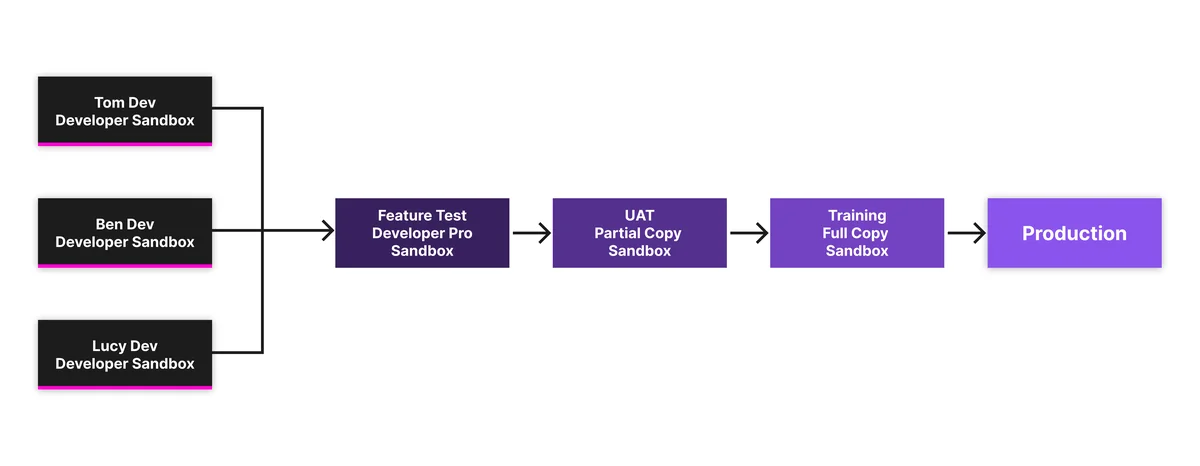
Test strategy depends on your sandbox mix. Developer and Developer Pro sandboxes are useful for metadata fixes and source-tracked work. Partial Copy and Full sandboxes are better for business regression tests because they include selected or complete production data according to sandbox type and template. Salesforce Help documents sandbox types and explains that Salesforce copies production metadata to sandboxes while copied data varies by sandbox type.
| Environment | Best use during updates | Watch point |
|---|---|---|
| Developer sandbox | Metadata search, Apex or Flow remediation, unit test updates | Data is limited, so do not use it as the only proof for business impact |
| Developer Pro sandbox | Admin and developer testing with more storage | Refresh cadence and data differences can hide production-only cases |
| Partial Copy sandbox | Targeted regression testing with selected production data | Sandbox template must include objects touched by the update |
| Full sandbox | Release rehearsal, integration testing, performance-sensitive validation | Refresh timing must align with sandbox preview and project milestones |
How to find metadata impacted by Salesforce Updates
The hardest part of salesforce updates is not reading the announcement. The risk comes from hidden usage, permission differences, and integrations that depend on behavior changed by salesforce updates. Start with Setup, then confirm with metadata search and Tooling API queries. Managed packages can hide implementation details, so ask the vendor for release guidance when an update could affect package logic.
Retrieve metadata with Salesforce CLI
Salesforce Developer Docs describe the Metadata API retrieve process and the Salesforce CLI project commands used to retrieve source. In a source-driven team, retrieve the metadata types most likely to reference the feature, then search locally.
# Authenticate to the sandbox used for impact analysis.
sf org login web --alias ReleasePreview --set-default

# Retrieve metadata listed in package.xml.
sf project retrieve start --manifest manifest/package.xml --target-org ReleasePreview

# Search locally for a feature keyword, field API name, permission, or endpoint.
grep -R "Legacy_Field__c" force-app/main/default
grep -R "ExternalCredential" force-app/main/default
grep -R "Run_Finance_Approval" force-app/main/default
Use a narrow manifest first, then expand. A large org can contain thousands of components, and broad retrievals slow the review. Keep the manifest in source control so the next release cycle starts with a known baseline.
<?xml version="1.0" encoding="UTF-8"?>
<Package xmlns="http://soap.sforce.com/2006/04/metadata">
    <types>
        <members>*</members>
        <name>ApexClass</name>
    </types>
    <types>
        <members>*</members>
        <name>Flow</name>
    </types>
    <types>
        <members>*</members>
        <name>PermissionSet</name>
    </types>
    <types>
        <members>*</members>
        <name>CustomApplication</name>
    </types>
    <version>67.0</version>
</Package>
Use the API version supported by your org and delivery pipeline. For an org on Summer ’26, API v67.0 is a common target, but package versions should follow your release governance and compatibility testing.
Query metadata with Tooling API
For developer-owned impact checks, Tooling API queries can locate code and metadata records quickly. The following examples do not modify data.
# Find Apex classes that contain a field or method name.
sf data query --use-tooling-api --target-org ReleasePreview \
  --query "SELECT Id, Name FROM ApexClass WHERE Body LIKE '%Legacy_Field__c%'"

# Find Apex triggers that contain a feature reference.
sf data query --use-tooling-api --target-org ReleasePreview \
  --query "SELECT Id, Name, TableEnumOrId FROM ApexTrigger WHERE Body LIKE '%Legacy_Field__c%'"
Do not rely only on string search. Flow XML, validation rules, permission sets, connected app policies, named credentials, external credentials, report filters, and managed package settings may also matter. For security-related salesforce updates, verify object permissions, field-level security, sharing, and user assignments as part of the same work item.
How to test Salesforce Updates before production
Many release updates provide a way to enable the behavior for testing before Salesforce enforces it. When this option is available, use it in a sandbox after supporting changes have been deployed. If users lose access, automation fails, or an integration returns a different error, disable the update if Salesforce allows it, fix the cause, and repeat the test.

Regression tests for admins
- Run the top record creation paths for each affected object.
- Test screen flows with users who have different permission sets.
- Check approval processes, assignment rules, escalation rules, duplicate rules, and validation rules that touch the feature.
- Confirm reports, dashboards, list views, and Lightning pages still load for standard user profiles.
- Review login, SSO, MFA, connected app, named credential, and external credential behavior for authentication changes.
Regression tests for developers
- Run Apex tests that cover the affected services, triggers, queueables, scheduled jobs, and batch classes.
- Run LWC Jest tests or component regression tests for UI behavior affected by Apex, LDS, or wire adapters.
- Execute integration tests for REST, SOAP, Bulk API, Platform Events, and external services that touch changed objects.
- Check async jobs after activation because queueable, batch, scheduled, and platform event work can fail after the user-facing smoke test passes.
- Review debug logs for permission, null handling, mixed DML, callout, and limit exceptions.
For Apex-backed Lightning components, include security tests in the salesforce updates checklist. Remember that Apex security behavior differs from the Salesforce UI. Salesforce Developer Docs state that Apex can run in system mode, and developers must enforce sharing, CRUD, and field-level security. Use with sharing, WITH USER_MODE, Security.stripInaccessible(), and permission-set testing where the update changes access behavior.
public with sharing class ReleaseReadinessAccountService {
    @AuraEnabled(cacheable=true)
    public static List<Account> findCustomerAccounts(String searchText) {
        String term = '%' + String.escapeSingleQuotes(searchText == null ? '' : searchText.trim()) + '%';

        // WITH USER_MODE enforces object and field permissions for the running user.
        return [
            SELECT Id, Name, Industry, OwnerId
            FROM Account
            WHERE Name LIKE :term
            WITH USER_MODE
            ORDER BY Name
            LIMIT 50
        ];
    }
}
This example is intentionally small. In real remediation work, bulkify service methods that process records, keep SOQL outside loops, and test with users who have the same permission sets as production users. If an update requires Apex deployment to production, Salesforce requires unit tests to pass and overall Apex coverage to meet the production threshold.
How to deploy fixes for Salesforce Updates
Deploy supporting fixes for salesforce updates the same way you deploy normal work. The safest path is source control, pull request review, automated validation, UAT sign-off, production deployment, activation, and smoke testing. Do not activate salesforce updates in production before the related metadata, permissions, and user communication are ready.
# Validate release remediation against UAT.
sf project deploy validate --manifest manifest/package.xml \
  --target-org UAT \
  --test-level RunLocalTests

# Deploy after validation and approval.
sf project deploy start --manifest manifest/package.xml \
  --target-org Production \
  --test-level RunLocalTests
Record the salesforce current version and the related release update name in the deployment ticket, so later support investigations can connect a defect to the release cycle. For a change set team, the principle is the same even if the tooling differs: build in a lower sandbox, test in UAT, deploy to production, then activate the update. For a DevOps Center or CI/CD team, keep the release update work item tied to commits and deployment evidence.
Production activation plan
| Step | Owner | Evidence to keep |
|---|---|---|
| Confirm release update status and enforcement timeline | Release owner | Setup screenshot, release note URL, work item |
| Deploy remediation metadata | Release manager | Deployment ID, test result, approved pull request |
| Activate update in production | Admin or platform owner | Activation time, approver, change record |
| Run smoke tests | QA, admin, business owner | Passed test checklist and defects if any |
| Monitor support and logs | Support lead, developer | Cases, debug logs, async job status, integration monitor |
Common errors with Salesforce Updates
Most failed salesforce updates projects fail because the team treats the update as an admin announcement instead of a tested change. The following errors show up often in production retrospectives.
Assuming a feature is unused because no one recognizes its name
Feature names in Release Notes often differ from the names users know. A release note can mention an authentication framework, while support calls it “SSO.” Search metadata and ask process owners before closing an item as not applicable.
Testing only with System Administrator
System Administrator testing hides permission problems. Run tests with real business profiles and permission sets. This is required for security-related salesforce updates, especially changes involving Flow access, Apex class access, object permissions, field permissions, sharing, external credentials, or connected apps.
Ignoring managed packages
Managed package code is not visible in your source search. Check package release notes, vendor advisories, and installed package versions. If an update changes a standard object, API behavior, authentication pattern, or UI framework used by a package, get written guidance from the package provider.
Using the wrong release calendar
A generic salesforce release schedule 2025 article is not enough for production planning. Your org follows its own instance window. Always pair the release name with Salesforce Status maintenance data for the instance you operate.
Best practices for Salesforce Updates
- Start with official sources. Use Release Notes, Salesforce Help, Developer Docs, Trailhead, and Salesforce Status instead of screenshots shared without context.
- Keep one release register. Spreadsheets work for small orgs, but enterprise orgs should track update decisions in Jira, Azure DevOps, DevOps Center work items, or the system used for normal change control.
- Keep a salesforce updates calendar. Include sandbox preview, production release windows, vendor package dates, remediation deadlines, and business blackout dates.
- Close each salesforce updates item. Mark the final outcome as activated, not applicable, deferred with reason, or remediated and tested.
- Use source control for release remediation. Configuration-only changes still need review when they affect access, automation, integrations, or data quality.
- Test users, not only features. A flow may work for an admin and fail for a service agent because of missing object, field, Apex class, or flow access.
- Document the rollback path. Some release updates can be disabled during testing; some become enforced and cannot be avoided after the deadline. Your plan must state which case applies.
- Communicate only what users need. Users do not need every release note. They need the changed screen, new permission behavior, training action, and support path.
Good release management in salesforce turns seasonal change into routine work. A stable salesforce updates process should be boring: identify, test, deploy, activate, monitor, and document.
The goal is not to read every sentence of every note. The goal of salesforce updates governance is to know which updates affect your org, prove the result in sandbox, and make production changes before enforcement.
Related SalesforceTutorial resources
- What is Salesforce and how the platform is organized
- Salesforce sandbox types and testing strategy
- Salesforce Flow automation design and testing
- Salesforce deployment methods for admins and developers
- Apex governor limits and bulkification patterns
Frequently Asked Questions
What are salesforce updates?
salesforce updates are Salesforce platform and product changes delivered through seasonal releases, release updates in Setup, release note changes, and product-specific upgrades. Admins should review them before each release window because some changes affect permissions, automation, integrations, and user workflows.
How do I find the salesforce current version for my org?
Check your org’s instance and maintenance history in Salesforce Status or My Trust Center, then compare it with the current Salesforce Release Notes. The salesforce current version can vary during rollout periods because sandbox preview and production upgrades happen on scheduled windows.
What is release management in salesforce?
release management in salesforce is the process for planning, testing, deploying, activating, and monitoring Salesforce changes across sandboxes and production. It includes normal project releases and Salesforce-delivered changes such as seasonal releases and release updates.
Where can I see the salesforce release schedule 2025?
The salesforce release schedule 2025 should be checked through official Salesforce release resources and Salesforce Status for your instance. Calendar-year 2025 included Spring ’25, Summer ’25, and Winter ’26 planning windows, but your production date depends on the instance maintenance schedule.
Should I activate a Salesforce release update in production first?
No. Test in a sandbox first, especially when the release update affects security, automation, Apex, integrations, or user access. Activate in production only after remediation is deployed, regression tests pass, and the change window is approved.
Do Salesforce updates require Apex code changes?
Some do, but many do not. Apex changes are more likely when an update affects API behavior, security enforcement, object access, field access, authentication, or platform behavior used by custom services. Search metadata, run tests, and validate with users who match production permissions.