Salesforce campaigns are the foundation of effective marketing operations in any CRM implementation. This guide covers campaign setup, management, and optimization for marketing teams using Salesforce Sales Cloud and Marketing Cloud.
What is a Salesforce Campaign?

A Salesforce campaign is a standard object that tracks marketing initiatives designed to generate leads, nurture prospects, and drive revenue. Campaigns connect marketing activities to measurable business outcomes through lead attribution and ROI tracking.
The Campaign object includes standard fields like Name, Active status, Type, Status, Start Date, End Date, Expected Revenue, and Budgeted Cost. Custom fields can extend functionality for specific business requirements.
Salesforce Marketing Campaigns vs Marketing Cloud
Salesforce offers two primary marketing solutions:
- Sales Cloud Campaigns: Built-in campaign tracking for lead generation and attribution
- Marketing Cloud: Advanced email marketing platform with automation capabilities
Marketing Cloud does work with inbound emails through Email Studio and Journey Builder, allowing automated responses to customer interactions. However, Sales Cloud campaigns focus on outbound marketing efforts and lead tracking.
Campaign Types and Use Cases
Common Salesforce campaign types include:
- Email Marketing: Newsletter campaigns, promotional emails, drip sequences
- Events: Trade shows, webinars, conferences, product demonstrations
- Digital Advertising: Google Ads, social media campaigns, banner advertisements
- Direct Mail: Physical mailers, catalogs, promotional materials
- Telemarketing: Cold calling campaigns, follow-up sequences
- Partner Marketing: Channel partner promotions, co-marketing initiatives
Setting Up Campaign Management in Salesforce
Marketing User Permission Requirements
Users need the “Marketing User” permission to create, edit, and manage campaigns. This permission controls access to campaign functionality and related features.
To enable marketing user permissions:
- Navigate to Setup → Users → Users
- Select the target user record
- Click Edit
- Check the “Marketing User” checkbox
- Save the changes
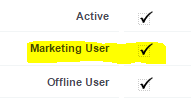
Note: Marketing User permission also enables access to campaign member import, campaign influence reporting, and advanced campaign analytics.
Campaign Hierarchy and Organization
Salesforce supports parent-child campaign relationships for complex marketing programs. Parent campaigns can contain multiple child campaigns, enabling:
- Program-level ROI analysis
- Cross-campaign reporting
- Budget allocation tracking
- Multi-touch attribution
Campaign Member Management
Campaign members represent the relationship between leads/contacts and campaigns. Each member has a status indicating their engagement level:
- Sent: Received campaign communication
- Responded: Engaged with campaign content
- Attended: Participated in events
- No Show: Registered but didn’t attend
Custom member statuses can be created for specific campaign types and business processes.
Lead Attribution and Conversion Tracking
Campaigns track lead sources through the “Campaign Source” field on leads and opportunities. When leads convert to opportunities, the associated campaign receives attribution for influenced revenue.
Key attribution metrics include:
- Number of leads generated
- Conversion rate to opportunities
- Total influenced revenue
- Cost per lead
- Return on investment (ROI)
Salesforce Campaign Training and Best Practices
Campaign Planning
Effective campaign management requires structured planning:
- Define Objectives: Set measurable goals for lead generation, revenue, or brand awareness
- Target Audience: Identify ideal customer profiles and segments
- Budget Allocation: Determine spending across channels and tactics
- Timeline: Establish start dates, milestones, and end dates
- Success Metrics: Define KPIs and measurement criteria
Integration with Marketing Automation
Salesforce campaigns integrate with marketing automation platforms through:
- API connections for real-time data sync
- Campaign member status updates
- Lead scoring and qualification
- Automated follow-up sequences
Popular integrations include Pardot (Marketing Cloud Account Engagement), HubSpot, Marketo, and Eloqua.
Reporting and Analytics
Campaign reporting provides insights into marketing performance:
- Campaign ROI Analysis: Revenue generated vs. costs invested
- Lead Source Reports: Attribution by campaign and channel
- Conversion Funnel Analysis: Lead progression through sales stages
- Multi-Touch Attribution: Credit distribution across touchpoints
Advanced Campaign Features
Campaign Influence
Campaign Influence tracks multiple campaigns that contribute to opportunity creation and closure. This feature requires:
- Marketing User permission
- Campaign Influence enabled in Setup
- Customizable attribution models
Web-to-Lead Integration
Campaigns can capture leads from web forms through Web-to-Lead functionality:
- Create campaign for lead source tracking
- Generate Web-to-Lead form code
- Include campaign ID in form parameters
- Test form submission and lead creation
Common Campaign Management Challenges
Data Quality Issues
- Duplicate campaign members: Implement deduplication rules
- Incomplete lead information: Require mandatory fields on forms
- Attribution gaps: Ensure consistent campaign tagging
Permission and Access Control
- Marketing User permission required for campaign access
- Profile-based permissions control create/edit/delete capabilities
- Sharing rules may limit campaign visibility
Frequently Asked Questions
Does Salesforce Marketing Cloud work on inbound emails?
Yes, Marketing Cloud handles inbound emails through Email Studio and Journey Builder. You can set up automated responses, trigger journeys based on email replies, and process inbound email content for customer service or marketing automation.
What permissions are needed for Salesforce campaign management?
Users need the “Marketing User” permission enabled at the user level. Additionally, profile permissions control whether users can create, edit, view, or delete campaigns. Object-level and field-level security also apply to campaign access.
How do Salesforce campaigns track ROI?
Campaigns track ROI by comparing the Budgeted Cost field against the Total Value of Won Opportunities influenced by the campaign. The system calculates ROI percentage and provides reporting on campaign effectiveness and revenue attribution.
Can I create campaign hierarchies in Salesforce?
Yes, Salesforce supports parent-child campaign relationships. You can create a parent campaign for an overall marketing program and link child campaigns for specific tactics or channels. This enables program-level reporting and budget tracking.
What is the difference between campaign members and campaign responses?
Campaign members are leads or contacts associated with a campaign, regardless of their response. Campaign responses specifically track members who have responded to the campaign (status marked as “Responded” or similar). All responses are members, but not all members are responses.
How do I integrate third-party marketing tools with Salesforce campaigns?
Integration options include REST/SOAP APIs for real-time data sync, bulk data import/export, and pre-built connectors for platforms like Pardot, HubSpot, and Marketo. Most integrations sync campaign members, update statuses, and pass lead attribution data.