
Understanding Salesforce CRM and other CRM software options is essential for businesses choosing the right customer relationship management platform. This guide compares Salesforce CRM with Zoho CRM, explaining what each platform offers and helping you make an informed decision.
What is Salesforce CRM?
Salesforce CRM is the world’s leading cloud-based customer relationship management platform, developed by Salesforce.com (often abbreviated as SFDC). SFDC means “Salesforce Dot Com” in software terminology, representing the company that pioneered cloud-based CRM solutions in 1999.
Salesforce CRM provides comprehensive tools for sales automation, marketing campaigns, customer service, and analytics. Unlike traditional on-premise solutions, Salesforce operates entirely in the cloud, making it accessible from anywhere with internet connectivity.
Key Salesforce CRM Features
- Lead and opportunity management
- Account and contact tracking
- Sales forecasting and pipeline management
- Marketing automation with Pardot
- Service Cloud for customer support
- Custom objects and fields
- Workflow automation and approval processes
- Advanced reporting and dashboards
- Mobile app for iOS and Android
- AppExchange marketplace with 3,000+ third-party apps
Introduction to Zoho CRM
Zoho CRM is developed by Zoho Corporation and was launched in 2005. Zoho Corporation is a US-based company that has developed the Zoho office suite, which contains many applications in a single suite including word processing, spreadsheets, presentations, databases, note-taking, invoicing, wikis, and Customer Relationship Management (CRM).
The word “Zoho” comes from a play on SOHO, which stands for “Small Office Home Office”. Zoho CRM is based on SaaS (Software as a Service) and provides online software services to its customers. When Zoho developed its applications, many small and medium business people showed interest. Zoho CRM has nearly 10 million customers.
Zoho CRM offers a free tier for basic usage. For commercial purposes and business applications, pricing varies depending on the subscription plan selected.
Zoho CRM is one of the Customer Relationship Management software platforms developed for business use. Zoho applications can be divided into 5 different categories:
- Documentation and Presentation
- Spreadsheets and Databases
- Communication and Scheduling tools
- Meeting and Collaboration Tools
- Apps for Business
CRM Software Training: Platform Comparison
When evaluating CRM software training options, it’s important to understand the different platforms available. Here are the major CRM software providers:
- Salesforce.com (Force.com platform)
- Microsoft Dynamics 365
- Oracle CRM on Demand
- Google Workspace (formerly Google Apps)
- Zoho CRM
- Siebel CRM (now part of Oracle)
Salesforce CRM Tutorial Resources
For comprehensive Salesforce CRM tutorial content, administrators and developers can access:
- Trailhead – Salesforce’s free learning platform
- Official Salesforce Help documentation
- Developer documentation at developer.salesforce.com
- Certification preparation materials
- Community forums and user groups
Zoho CRM Editions and Pricing
Different Zoho CRM Editions
- Free Edition
- Professional Edition
- Enterprise Edition
Free Edition
- Available to everyone at no cost
- Up to 100MB storage space for files
- 1,500 records per batch import
- Basic CRM functionality
Professional Edition
- $12 per user per month
- 250MB of storage space
- 250 marketing emails per day
- 10,000 records per batch import
- Secure Socket Layer (SSL) support
- Data encryption
- Hierarchical roles
Enterprise Edition
- $25 per user per month
- 500MB of storage space
- 20,000 records per batch import
- Autoresponder functionality
- Data sharing rules for user profiles
- Secure Socket Layer (SSL) support
- Data encryption
- Advanced customization options
Zoho CRM Login and Account Setup
To access all applications in Zoho CRM, you need to log into the Zoho platform. Using one username and password, you can access all applications through Single Sign-On (SSO).
How to Create a Zoho CRM Account
Method 1: Direct Registration
- Go to crm.zoho.com
- Click the Zoho CRM Sign Up button
- Enter all required details (name, email, company information)
- Click the Submit button
- Check your email for the confirmation message
Method 2: Social Login
You can sign up for Zoho using your Google or Yahoo account credentials for faster registration.
After signing up through crm.zoho.com, a confirmation email will be sent to your registered email address.
Zoho CRM Interface and Navigation
The Zoho CRM interface includes a menu bar with sections for Pulse, Leads, Accounts, Contacts, Potentials, and more. You can customize the menu to add or hide menu items based on your business needs.
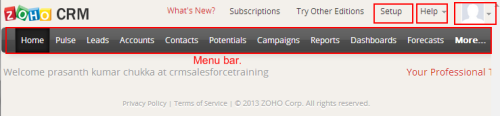
The More menu appears in the menu bar as shown below:
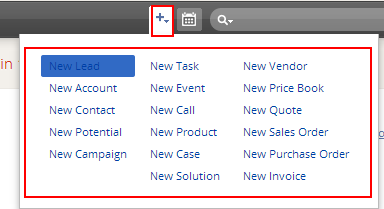
From the More menu, you can create new records with a single click: new leads, accounts, contacts, potentials, campaigns, tasks, events, products, and other CRM records.
Search Functionality
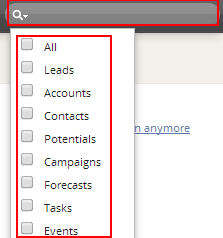
The search box is located on the left side of the page. You can search for recently created or recently modified items. A dropdown list provides options for creating new items quickly.
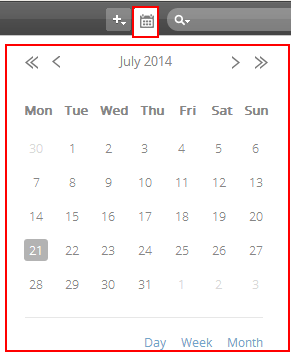
Calendar Integration
Zoho CRM includes an integrated calendar for managing appointments, tasks, and events:
Zoho CRM Setup and Customization
The Setup menu allows you to customize tabs and configure your CRM. The Setup menu is located at the top of the page.
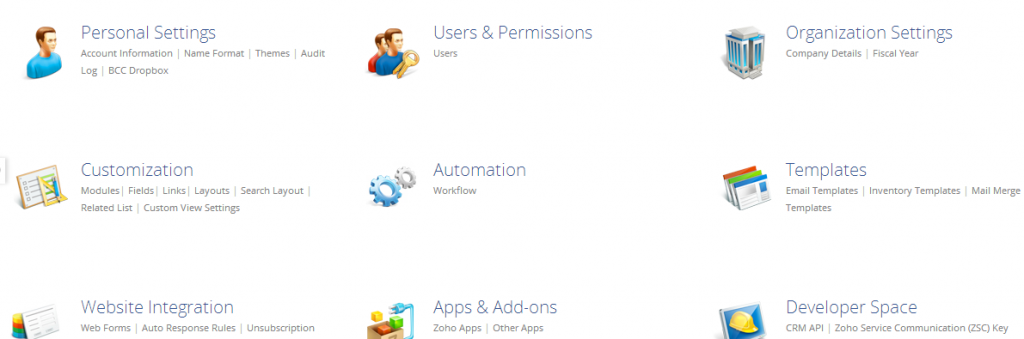
The setup menu contains 11 applications for customizing your Zoho CRM:
Personal Settings
- Account Information: Language, country, time format, and time zone settings
- Name Format: Customize name format for users, leads, and contacts
- Themes: Background color, layout, and tab bar customization
- Audit Log Information: Track all user actions and system changes
- BCC Dropbox: Automatically save copies of sent emails
User & Permissions
- Users: Add new users and manage subscription plans
- Roles: Define user roles and access levels
- Profiles: Set permissions for different user types
Organizational Settings
- Company Details: Company information including name, employee count, phone number, address, and company logo
- Fiscal Year: Configure your organization’s fiscal year settings
- Currencies: Set up multiple currencies for global operations
What is CLM Software?
CLM software stands for Contract Lifecycle Management software. While not directly related to CRM, CLM systems often integrate with CRM platforms like Salesforce to manage the complete contract process from creation to renewal. Salesforce offers CLM capabilities through Salesforce CPQ (Configure, Price, Quote) and third-party AppExchange solutions.
CRM Cloud Software Training Considerations
When choosing CRM cloud software training, consider these factors:
- Platform Complexity: Salesforce requires more extensive training due to its advanced customization capabilities
- User Adoption: Zoho CRM has a gentler learning curve for small teams
- Certification Paths: Salesforce offers comprehensive certification programs for administrators, developers, and consultants
- Training Resources: Both platforms provide online training, but Salesforce’s Trailhead is more comprehensive
- Implementation Time: Zoho CRM can be deployed faster, while Salesforce implementations often require more planning
Salesforce CRM vs Zoho CRM: Key Differences
| Feature | Salesforce CRM | Zoho CRM |
|---|---|---|
| Market Position | Enterprise leader | SMB focused |
| Customization | Extensive (Apex, Lightning) | Limited but user-friendly |
| Integration | 3,000+ AppExchange apps | Zoho ecosystem integration |
| Pricing | $25-$300+ per user/month | Free-$25 per user/month |
| Learning Curve | Steep | Moderate |
| Mobile App | Full-featured | Basic functionality |
Frequently Asked Questions
What is Salesforce CRM and how does it work?
Salesforce CRM is a cloud-based customer relationship management platform that helps businesses manage sales, marketing, and customer service processes. It works by storing customer data in the cloud and providing tools for lead management, opportunity tracking, and sales automation. Users access Salesforce through web browsers or mobile apps.
What does SFDC mean in software?
SFDC means “Salesforce Dot Com” in software terminology. It refers to Salesforce.com, the company that created the Salesforce CRM platform. SFDC is commonly used as an abbreviation in technical documentation and business contexts.
Is Zoho CRM better than Salesforce for small businesses?
Zoho CRM can be better for small businesses due to its lower cost, simpler interface, and free tier option. However, Salesforce offers more advanced features and scalability. The choice depends on your budget, technical requirements, and growth plans.
What is CLM software and how does it relate to CRM?
CLM software stands for Contract Lifecycle Management software. It manages the entire contract process from creation to renewal. CLM systems often integrate with CRM platforms to provide a complete view of customer relationships and contractual obligations.
Where can I find Salesforce CRM tutorial resources?
The best Salesforce CRM tutorial resources include Trailhead (Salesforce’s free learning platform), official Salesforce Help documentation, developer.salesforce.com, and community forums. These resources offer step-by-step guides for administrators, developers, and end users.
What CRM cloud software training should I choose?
Choose CRM cloud software training based on your platform (Salesforce, Zoho, etc.), role (admin, developer, user), and career goals. Salesforce offers the most comprehensive certification paths, while Zoho provides simpler training for basic CRM usage.